
Prefabに含まれる別のPrefabと、Variantの派生元をCSVへ出力し、参照グラフで確認する例です。同名PrefabをGUIDで分け、矢印は「依存する側→参照先」にそろえます。GameObjectの内部階層一覧はPrefab内部のCSV、保存フォルダーの一覧はPrefabファイルのツリーCSVを使います。
仕様参照はUnity 6.3 LTS(6000.3)です。純粋C#のCSV整形、JavaScriptの行検証・グラフ走査、架空データを使ったCytoscape 3.23.0のローカル表示を確認しました。Unity Editorでのコンパイル・Prefab抽出、Google Sheetsへの実取込、Apps Scriptの実行・権限・デプロイは未確認です。元記事の画像は旧版の資料で、今回の修正版の結果ではありません。
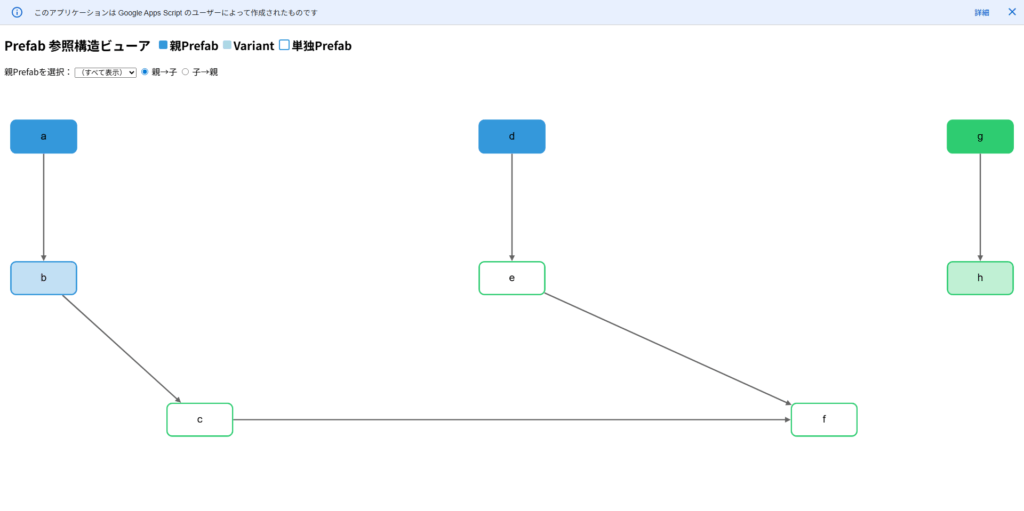
次は旧ビューアーの画面です。新版では色をAssetType、線をNested/Variantに分け、フォルダー名で固定配色する方式を使いません。
継承の確認だけなら標準機能を先に見る
Variantの継承関係だけを確認したい場合は、標準のPrefab Family表示で目的を満たせるか先に確認します。Unityの2022.2 Prefab機能紹介にはPrefab Familyが紹介されています。ここで作るCSVとWebビューアーは、選んだ複数フォルダーのPrefabを一覧にし、NestedとVariantを関係別に絞る用途です。
このツールが取得する関係と対象外
| 項目・症状 | 条件・確認先 |
|---|---|
| 入力 | Projectで選んだAssets内の1つ以上のフォルダーと子フォルダーの.prefab。重複する選択は除去。選択に混ざったフォルダー以外は無視。Packages・FBXの直接走査は対象外。 |
| Nestedの矢印 | 走査したPrefab→その内容の全階層に含まれるPrefabインスタンスの参照先。非Activeも含む。直接の子だけでなく、入れ子の奥にある参照先も含む実効的な包含。 |
| Variantの矢印 | Variant→直近の派生元Prefab。Nestedの疑似行を追加しない。派生元をさらにたどるには、その派生元も走査対象に含める。 |
| GUIDと同名 | GUIDをノードIDにする。名前が同じでも別GUIDは別ノード。パスと名前を表示属性として保持する。 |
| 参照先だけのノード | 走査対象外でもAssets内にあるPrefabやModelが参照先に現れたらノードを追加する。追加した参照先から先の関係は未走査で、破線の枠で区別する。Packages内の参照先は登録できず、参照元の走査エラーになる。 |
| 取得しない依存 | Material・Texture・Scene・スクリプトのフィールド参照など、一般のAssetDatabase依存一覧は取得しない。動的Instantiate、Missingの完全検出や未使用判定にも使わない。 |
| サイズと失敗 | 2000ノード・5000辺・10000行上限。小さい検証用フォルダーから試す。個別走査の失敗はErrorノードとConsoleへ残し、そのPrefabの部分的な辺は採用しない。ただし初期ノード登録やPrefab解放で例外が出ると全体を中断し、CSVを保存しない。 |
例としてAの中にB、Bの中にCがある場合、Aの全階層走査にはA→BとA→Cが含まれます。Bも対象ならB→Cも出ます。このNestedは直近の親子だけを表す木ではありません。Overrideを含むロード後の内容を調べるため、Variantが継承した入れ子も包含に現れる場合があります。Variantの継承線とは分けて読みます。
同じ組合せのNestedは1辺へまとめ、配置数は集計しません。NestedとVariantが実際に両方ある組合せは2種類の辺を保持します。「ほかから参照される」をBaseというAssetTypeに置き換えず、Regular・Variant・Modelと関係の有無を区別します。
1. C#を導入してCSVを保存する
- プロジェクトを複製し、次の全文をAssets/Editor/ExportPrefabGraph.csとして保存します。旧ExportPrefabRelationshipsとはクラス名とCSV形式が違います。Editor専用asmdefではEditor参照を持つAssemblyへ置きます。
- Play Modeを停止し、Consoleのコンパイルエラーを確認します。同名の別フォルダーPrefab、Variantと派生元、Groupの下の入れ子、単独Prefabを少数用意します。
- Projectで確認用フォルダーを選び、Tools → CG Method → Export Prefab Reference Graph CSVを実行します。途中取消ではCSVを保存しません。
- 保存ダイアログではAssets外の新しい.csvを選びます。既存ファイルはCreateNewで拒否します。取消は保存しません。書込み失敗時は不完全なファイルが残る可能性があるので、Consoleと保存先を確認してから新しい名前で再実行します。
- Consoleのnodes・edges・failedとCSVの9列を確認します。failedが0でも関係の正しさは最小Prefabの期待値と照合します。Errorがあればグラフを完全な一覧と判断しません。
using System;
using System.Collections.Generic;
using System.IO;
using System.Linq;
using System.Text;
using UnityEditor;
using UnityEngine;

public static class ExportPrefabGraph
{
    private sealed class Node
    {
        public string Guid, Path, Name, Type, Status;
        public bool InScope;
    }
    private sealed class Edge
    {
        public string From, To, Relation;
    }
    [MenuItem("Tools/CG Method/Export Prefab Reference Graph CSV")]
    private static void Export()
    {
        if (EditorApplication.isPlayingOrWillChangePlaymode)
            throw new InvalidOperationException("Stop Play Mode before exporting.");
        string[] roots = Selection.objects.Select(AssetDatabase.GetAssetPath)
            .Where(p => (p == "Assets" || p.StartsWith("Assets/", StringComparison.Ordinal)) && AssetDatabase.IsValidFolder(p))
            .Distinct().OrderBy(p => p, StringComparer.Ordinal).ToArray();
        if (roots.Length == 0) {Debug.LogError("Select one or more Assets folders in Project."); return;}
        var paths = AssetDatabase.FindAssets("t:Prefab", roots).Select(AssetDatabase.GUIDToAssetPath)
            .Where(p => p.EndsWith(".prefab", StringComparison.OrdinalIgnoreCase))
            .Distinct().OrderBy(p => p, StringComparer.Ordinal).ToArray();
        if (paths.Length == 0) {Debug.LogWarning("No .prefab files in selected folders."); return;}
        var scope = new HashSet<string>(paths, StringComparer.Ordinal);
        var nodes = new Dictionary<string, Node>(StringComparer.Ordinal);
        var edges = new Dictionary<string, Edge>(StringComparer.Ordinal);
        int errors = 0;
        try
        {
            // Register all selected assets, including ones with no outgoing relationships.
            foreach (string path in paths) Register(path, scope, nodes);
            for (int i = 0; i < paths.Length; i++)
            {
                string path = paths[i];
                if (EditorUtility.DisplayCancelableProgressBar("Prefab reference graph", path, (float)i / paths.Length))
                {Debug.LogWarning("Cancelled. No CSV saved."); return;}
                Node source = nodes[AssetDatabase.AssetPathToGUID(path)];
                var found = new List<KeyValuePair<string, string>>();
                GameObject loaded = null;
                try
                {
                    var asset = AssetDatabase.LoadAssetAtPath<GameObject>(path);
                    if (asset == null) throw new InvalidDataException("Prefab asset could not be loaded.");
                    if (PrefabUtility.GetPrefabAssetType(asset) == PrefabAssetType.Variant)
                    {
                        var baseAsset = PrefabUtility.GetCorrespondingObjectFromSource(asset);
                        string basePath = AssetDatabase.GetAssetPath(baseAsset);
                        if (String.IsNullOrEmpty(basePath)) throw new InvalidDataException("Immediate Variant base was not found.");
                        found.Add(new KeyValuePair<string,string>(basePath, "Variant"));
                    }
                    loaded = PrefabUtility.LoadPrefabContents(path);
                    // Effective containment at every depth, NOT only immediate dependencies.
                    // Skip the loaded root: Variant inheritance is a separate relation above.
                    foreach (Transform transform in loaded.GetComponentsInChildren<Transform>(true))
                    {
                        if (transform.gameObject == loaded || !PrefabUtility.IsAnyPrefabInstanceRoot(transform.gameObject)) continue;
                        string nestedPath = PrefabUtility.GetPrefabAssetPathOfNearestInstanceRoot(transform.gameObject);
                        if (String.IsNullOrEmpty(nestedPath)) throw new InvalidDataException("Nested asset path was not found.");
                        found.Add(new KeyValuePair<string,string>(nestedPath, "Nested"));
                    }
                    // Stage per asset. A failed scan supplies no partial outgoing edges.
                    var staged = new List<Edge>();
                    foreach (var relation in found)
                    {
                        Node target = Register(relation.Key, scope, nodes);
                        if (target.Guid == source.Guid) throw new InvalidDataException("Self reference was found.");
                        staged.Add(new Edge {From=source.Guid, To=target.Guid, Relation=relation.Value});
                    }
                    foreach (Edge edge in staged)
                        edges[edge.Relation + "_" + edge.From + "_" + edge.To] = edge;
                    source.Status = "Ready";
                }
                catch (Exception error)
                {
                    source.Status = "Error"; errors++;
                    Debug.LogError("Prefab scan failed: " + path + "\n" + error);
                }
                finally
                {
                    if (loaded != null) PrefabUtility.UnloadPrefabContents(loaded);
                }
            }
        }
        catch (Exception error) {Debug.LogError("Export aborted before saving: " + error); return;}
        finally {EditorUtility.ClearProgressBar();}
        if (nodes.Count > 2000 || edges.Count > 5000)
        {Debug.LogError("Viewer limit exceeded. Select smaller folders: 2000 nodes / 5000 edges."); return;}
        var rows = new List<string[]>();
        rows.Add(PrefabGraphCsv.Header);
        foreach (Node node in nodes.Values.OrderBy(n => n.Path, StringComparer.Ordinal))
            rows.Add(new[] {"Node",node.Guid,node.Path,node.Name,node.Type,"","",node.InScope ? "true" : "false",node.Status});
        foreach (var entry in edges.OrderBy(e => e.Key, StringComparer.Ordinal))
        {Edge e = entry.Value; rows.Add(new[] {"Edge",e.From,"","","",e.To,e.Relation,"",""});}
        if (rows.Count > 10000) {Debug.LogError("Too many CSV rows."); return;}
        string output = EditorUtility.SaveFilePanel("Save Prefab graph CSV", "", "prefab_graph_" + DateTime.Now.ToString("yyyyMMdd_HHmmss") + ".csv", "csv");
        if (String.IsNullOrEmpty(output)) return;
        try
        {
            byte[] data = new UTF8Encoding(true).GetPreamble().Concat(Encoding.UTF8.GetBytes(PrefabGraphCsv.Encode(rows))).ToArray();
            using (var file = new FileStream(output, FileMode.CreateNew, FileAccess.Write, FileShare.None))
                file.Write(data, 0, data.Length);
            Debug.Log("CSV saved: " + output + "; nodes=" + nodes.Count + "; edges=" + edges.Count + "; failed=" + errors);
        }
        catch (Exception error) {Debug.LogError("CSV save failed; check for an incomplete file: " + output + "\n" + error);}
    }
    private static Node Register(string path, HashSet<string> scope, Dictionary<string,Node> nodes)
    {
        if (!path.StartsWith("Assets/", StringComparison.Ordinal))
            throw new InvalidDataException("This schema handles Assets paths only: " + path);
        string guid = AssetDatabase.AssetPathToGUID(path);
        if (String.IsNullOrEmpty(guid)) throw new InvalidDataException("Asset GUID not found: " + path);
        Node existing;
        if (nodes.TryGetValue(guid, out existing)) return existing;
        var asset = AssetDatabase.LoadAssetAtPath<GameObject>(path);
        if (asset == null) throw new InvalidDataException("Referenced asset could not be loaded: " + path);
        var type = PrefabUtility.GetPrefabAssetType(asset);
        if (type != PrefabAssetType.Regular && type != PrefabAssetType.Variant && type != PrefabAssetType.Model)
            throw new InvalidDataException("Unsupported Prefab type: " + path);
        var node = new Node {Guid=guid, Path=path, Name=System.IO.Path.GetFileNameWithoutExtension(path),
            Type=type.ToString(), InScope=scope.Contains(path), Status=scope.Contains(path) ? "Error" : "ReferencedOnly"};
        nodes.Add(guid,node); return node;
    }
}

public static class PrefabGraphCsv
{
    public static readonly string[] Header = {"Record","GUID","Path","Name","AssetType","TargetGUID","Relation","InScope","ScanStatus"};
    public static string Encode(IEnumerable<string[]> rows)
    {
        var output = new StringBuilder();
        foreach (string[] row in rows)
        {
            if (row == null || row.Length != 9) throw new ArgumentException("Nine columns are required.");
            for (int i = 0; i < row.Length; i++)
            {
                if (i != 0) output.Append(',');
                output.Append('"').Append((row[i] ?? "").Replace("\"", "\"\"")).Append('"');
            }
            output.Append("\r\n");
        }
        return output.ToString();
    }
}
内容はLoadPrefabContentsで分離されたSceneへ読み、finallyでUnloadPrefabContentsを呼びます。Prefabを保存するAPIは使いませんが、Edit Modeの独自スクリプトの副作用まで無変更とは保証しません。
全階層のインスタンス境界はIsAnyPrefabInstanceRootで確認し、ロードしたルートを除外します。参照パスはGetPrefabAssetPathOfNearestInstanceRoot、Variantの直近の対応元はGetCorrespondingObjectFromSourceを参照します。GetCorrespondingObjectFromOriginalSourceで最遠の派生元へ置き換える処理ではありません。
2. 9列CSVの読み方
| 項目・症状 | 条件・確認先 |
|---|---|
| Record | Node=Prefabそのもの、Edge=関係。旧4列CSVは互換ではない。 |
| GUID・Path・Name・AssetType | Node行の識別と表示属性。AssetTypeはRegular・Variant・Model。Edge行のGUIDは依存する側。 |
| TargetGUID・Relation | Edge行の参照先GUIDとNested/Variant。Node行では空欄。 |
| InScope・ScanStatus | Node行のtrue/falseとReady/Error/ReferencedOnly。Ready=走査した、Error=失敗、ReferencedOnly=参照先として登録しただけ。 |
全フィールドを二重引用符で囲み、フィールド内の引用符を2つへ増やすCSVです。改行はCRLF、UTF-8 BOM付き。同名・日本語・カンマ・引用符・改行の名前も、列を分けずに保持します。表計算への取込時にはテキストとして保持し、文字列の自動変換を切ります。
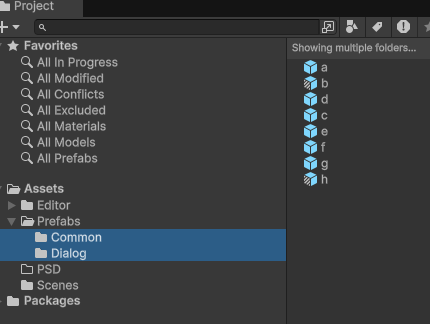
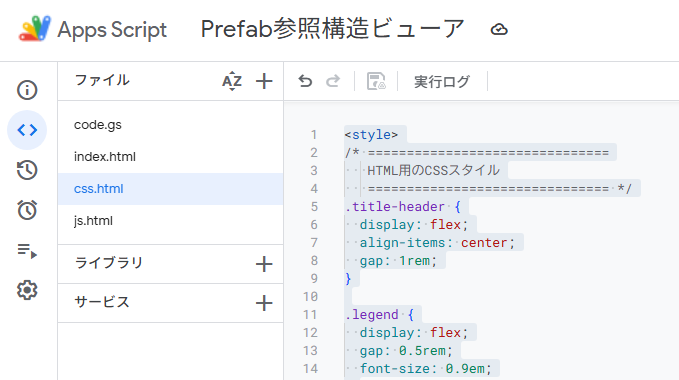
次の2画像は旧CSV・旧導入の資料です。新版の列は上の9列で、旧4列をそのままSheetsへ渡すとヘッダーエラーになります。

3. Google SheetsとApps Scriptを準備する
- 最初は実プロジェクトのCSVではなく、架空の名前・パスを持つ少数のデータで確認します。この方式はCSVをGoogle Sheetsへ置くため、使うプロジェクトの情報をそのアカウントへ保存できる条件も確認してください。
- 自分が管理するスプレッドシートにPrefabGraphシートを用意し、CSVをA1から9列で取り込みます。インポート時の「テキストを数値、日付、数式に変換する」を無効にし、GUIDや名前を文字列で保持します。追加の内容列を同じシートへ作らないでください。
- Apps ScriptにCode.gsとHTMLファイルindex・js・cssを作成し、以下の4全文をそれぞれ保存します。HTMLファイルのコード表示はindex.html・js.html・css.htmlですが、includeには拡張子を付けません。
- Code.gsのspreadsheetIdを当該スプレッドシートのIDに置き換えます。sheetNameも実際のタブ名に合わせます。Webアプリで「現在のシート」を推測せずopenByIdを使用します。
- 初回は自分だけが利用できるテスト用デプロイで、実行ユーザーがそのSheetを読めることを確認します。実行者・アクセス対象とアカウント/組織の制約はGoogle公式のWebアプリ資料で確認します。匿名公開を前提にする手順ではありません。
- 自分のWebアプリURLを開きます。ローカルでindex.htmlだけを開くとgoogle.script.runがないため失敗します。コードを変えたときは、テスト/デプロイの版と表示しているURLが一致することを確認します。
この例はバインドされたスクリプトの制約とSpreadsheetAppの仕様を参照し、getActiveの結果をWebアプリにあると仮定しません。この記事の改稿作業ではGoogleへのCSVアップロードやサービスのデプロイを実行していません。
4. Code.gs:固定Sheetと行の検証
ヘッダー・GUID・9列・AssetType・ScanStatus・辺の両端と型を検証します。不明な行を黙って無視しません。古い4列や重複GUID、Variant以外からの継承線、失敗した走査元の辺を拒否します。
// Set a spreadsheet you control; do not broaden Web app access for project asset data.
const PREFAB_VIEWER_CONFIG = Object.freeze({
  spreadsheetId: 'REPLACE_WITH_SPREADSHEET_ID',
  sheetName: 'PrefabGraph',
  maxRows: 10000,
  maxNodes: 2000,
  maxEdges: 5000
});

function doGet() {
  return HtmlService.createTemplateFromFile('index').evaluate().setTitle('Prefab reference viewer');
}

function include(name) {
  if (!['js', 'css'].includes(name)) throw new Error('Unknown template.');
  return HtmlService.createHtmlOutputFromFile(name).getContent();
}

function getPrefabGraphData() {
  const cfg = PREFAB_VIEWER_CONFIG;
  if (cfg.spreadsheetId === 'REPLACE_WITH_SPREADSHEET_ID')
    throw new Error('Set spreadsheetId in Code.gs before running.');
  const sheet = SpreadsheetApp.openById(cfg.spreadsheetId).getSheetByName(cfg.sheetName);
  if (!sheet) throw new Error('Configured sheet was not found.');
  const lastRow = sheet.getLastRow();
  const lastColumn = sheet.getLastColumn();
  if (!lastRow) throw new Error('Import the CSV header and rows first.');
  if (lastRow > cfg.maxRows || lastColumn !== 9)
    throw new Error('Expected exactly 9 columns, at most ' + cfg.maxRows + ' rows.');
  const rows = sheet.getRange(1, 1, lastRow, 9).getDisplayValues();
  return parsePrefabRows(rows, cfg);
}

// Pure conversion. These exact functions are independently tested with synthetic rows.
function parsePrefabRows(rows, limits) {
  const header = ['Record','GUID','Path','Name','AssetType','TargetGUID','Relation','InScope','ScanStatus'];
  const cfg = limits || {maxRows:10000, maxNodes:2000, maxEdges:5000};
  if (!Array.isArray(rows) || rows.length < 2 || rows.length > cfg.maxRows)
    throw new Error('No graph rows or too many rows.');
  if (!Array.isArray(rows[0]) || rows[0].length !== 9 ||
      rows[0].some((value, i) => String(value) !== header[i]))
    throw new Error('CSV header does not match the 9-column schema.');
  const nodes = new Map();
  const pending = [];
  const guidPattern = /^[0-9a-f]{32}$/;
  for (let n = 1; n < rows.length; n++) {
    const row = rows[n];
    if (!Array.isArray(row) || row.length !== 9) throw new Error('Wrong column count at row ' + (n + 1));
    const r = row.map(value => String(value == null ? '' : value));
    if (r.every(value => value === '')) continue;
    if (!guidPattern.test(r[1])) throw new Error('Invalid GUID at row ' + (n + 1));
    if (r[0] === 'Node') {
      if (nodes.has(r[1])) throw new Error('Duplicate node GUID at row ' + (n + 1));
      if (!r[2].startsWith('Assets/') || !r[3] || !['Regular','Variant','Model'].includes(r[4]) || r[5] || r[6])
        throw new Error('Invalid node fields at row ' + (n + 1));
      if (!['true','false'].includes(r[7].toLowerCase())) throw new Error('Invalid InScope at row ' + (n + 1));
      const inScope = r[7].toLowerCase() === 'true';
      if (inScope ? !['Ready','Error'].includes(r[8]) : r[8] !== 'ReferencedOnly')
        throw new Error('Invalid scan status at row ' + (n + 1));
      if (inScope && r[4] === 'Model') throw new Error('Model nodes must be referenced only.');
      nodes.set(r[1], {id:'n' + r[1], guid:r[1], label:r[3], path:r[2],
        folder:r[2].slice(0, r[2].lastIndexOf('/')), assetType:r[4], inScope, scanStatus:r[8]});
      if (nodes.size > cfg.maxNodes) throw new Error('Too many nodes.');
    } else if (r[0] === 'Edge') {
      if (!guidPattern.test(r[5]) || !['Nested','Variant'].includes(r[6]) ||
          [r[2],r[3],r[4],r[7],r[8]].some(Boolean) || r[1] === r[5])
        throw new Error('Invalid edge fields at row ' + (n + 1));
      pending.push({sourceGUID:r[1], targetGUID:r[5], relation:r[6]});
    } else throw new Error('Unknown record type at row ' + (n + 1));
  }
  if (!nodes.size) throw new Error('No node records.');
  const edges = new Map();
  const baseByVariant = new Map();
  for (const edge of pending) {
    const source = nodes.get(edge.sourceGUID);
    const target = nodes.get(edge.targetGUID);
    if (!source || !target) throw new Error('Edge endpoint node is missing.');
    if (!source.inScope || source.scanStatus !== 'Ready')
      throw new Error('Only a successfully scanned node can supply edges.');
    if (edge.relation === 'Variant') {
      if (source.assetType !== 'Variant') throw new Error('Variant edge source must be a Variant asset.');
      const previous = baseByVariant.get(source.guid);
      if (previous && previous !== target.guid) throw new Error('A Variant has more than one immediate base.');
      baseByVariant.set(source.guid, target.guid);
    }
    const id = 'e' + edge.relation + '_' + source.guid + '_' + target.guid;
    edges.set(id, {id, source:source.id, target:target.id, relation:edge.relation});
    if (edges.size > cfg.maxEdges) throw new Error('Too many edges.');
  }
  return {nodes:[...nodes.values()], edges:[...edges.values()], summary:{
    nodeCount:nodes.size, edgeCount:edges.size,
    failedNodes:[...nodes.values()].filter(node => node.scanStatus === 'Error').length,
    referencedOnlyNodes:[...nodes.values()].filter(node => !node.inScope).length
  }};
}
5. index.html:画面と読み込むファイル
Cytoscapeは3.23.0へ固定しています。CDNから読み込む構成なので、通信制限がある場合は接続条件を確認します。GASのテンプレート記法を残したまま保存してください。
<!doctype html>
<html lang="ja">
<head>
  <meta charset="utf-8">
  <meta name="viewport" content="width=device-width, initial-scale=1">
  <base target="_top">
  <script src="https://unpkg.com/cytoscape@3.23.0/dist/cytoscape.min.js"></script>
  <?!= include('css'); ?>
</head>
<body>
  <main>
    <h1>Prefab参照グラフ</h1>
    <p>矢印は依存する側から参照先へ。Nestedは全階層に含まれるPrefab、Variantは直近の派生元です。</p>
    <div class="controls">
      <label>起点Prefab <select id="prefabSelect" disabled><option value="">全体</option></select></label>
      <label>たどる方向 <select id="direction" disabled><option value="dependencies">参照先をたどる</option><option value="users">このPrefabを使う側をたどる</option></select></label>
      <label>関係 <select id="relation" disabled><option value="all">両方</option><option value="Nested">Nestedのみ</option><option value="Variant">Variantのみ</option></select></label>
      <button id="reload" type="button">再読込</button>
    </div>
    <p id="status" role="status" aria-live="polite">読み込み前です。</p>
    <p class="legend">ノード:通常=緑、Variant=紫、Model=灰色、走査失敗=赤。破線の枠=参照先のみ。矢印:Nested=緑実線、Variant=青破線。</p>
    <div id="cy" aria-label="Prefab参照グラフ"></div>
    <p id="details">ノードを選ぶと保存パスとGUIDを表示します。</p>
    <noscript>JavaScriptを有効にして再読込してください。</noscript>
  </main>
  <?!= include('js'); ?>
</body>
</html>
6. js.html:方向・関係・失敗時の表示
参照先はsource→target、使う側はtarget→sourceを走査します。visited集合で循環しても停止します。関係別の辺IDを持たせ、NestedとVariantをつぶしません。Googleのgoogle.script.run公式仕様に従い成功と失敗のハンドラーを用意します。
<script>
// Dependency direction is source -> target: containing asset -> nested asset,
// or variant -> immediate base. A visited set makes cycles terminate.
function walkPrefabGraph(graph, start, direction, relation) {
  if (!['dependencies','users'].includes(direction) || !['all','Nested','Variant'].includes(relation))
    throw new Error('Unknown graph filter.');
  if (!graph.nodes.some(node => node.id === start)) throw new Error('Unknown starting node.');
  const ids = new Set([start]);
  const edgeIds = new Set();
  const queue = [start];
  let offset = 0;
  while (offset < queue.length) {
    const current = queue[offset++];
    for (const edge of graph.edges) {
      if (relation !== 'all' && edge.relation !== relation) continue;
      const from = direction === 'dependencies' ? edge.source : edge.target;
      const to = direction === 'dependencies' ? edge.target : edge.source;
      if (from !== current) continue;
      edgeIds.add(edge.id);
      if (!ids.has(to)) {ids.add(to); queue.push(to);}
    }
  }
  return {nodeIds:[...ids], edgeIds:[...edgeIds]};
}

let prefabFullData = null;
let prefabCy = null;
const prefabStatus = document.getElementById('status');
const prefabDetails = document.getElementById('details');
const prefabControls = ['prefabSelect','direction','relation'].map(id => document.getElementById(id));
const prefabReload = document.getElementById('reload');
function prefabSetBusy(busy) {
  prefabControls.forEach(control => {control.disabled = busy || !prefabFullData;});
  prefabReload.disabled = busy;
}
function prefabFail(error) {
  prefabFullData = null;
  if (prefabCy) {prefabCy.destroy(); prefabCy = null;}
  prefabDetails.textContent = 'ノードは表示されていません。';
  prefabStatus.textContent = '読込失敗:' + (error && error.message ? error.message : String(error));
  prefabSetBusy(false);
}
function prefabLoad() {
  prefabSetBusy(true);
  prefabStatus.textContent = 'スプレッドシートを読み込んでいます…';
  if (typeof cytoscape !== 'function') {prefabFail(new Error('CytoscapeのCDN読込に失敗しました。接続を確認しページ全体を再読込してください。')); return;}
  if (typeof google === 'undefined' || !google.script || !google.script.run)
  {prefabFail(new Error('Apps ScriptのWebアプリで開いてください。')); return;}
  google.script.run.withSuccessHandler(prefabInit).withFailureHandler(prefabFail).getPrefabGraphData();
}
function prefabInit(data) {
  try {
    if (!data || !Array.isArray(data.nodes) || !Array.isArray(data.edges) || !data.nodes.length)
      throw new Error('ノードのないデータです。CSVのNode行を確認してください。');
    prefabFullData = data;
    const select = prefabControls[0];
    select.replaceChildren();
    const all = document.createElement('option'); all.value = ''; all.textContent = '全体'; select.appendChild(all);
    [...data.nodes].sort((a,b) => a.path.localeCompare(b.path)).forEach(node => {
      const option = document.createElement('option'); option.value = node.id;
      option.textContent = node.label + ' — ' + node.path;
      select.appendChild(option);
    });
    prefabSetBusy(false);
    prefabDraw();
  } catch (error) {prefabFail(error);}
}
function prefabDraw() {
  if (!prefabFullData) return;
  try {
    const start = prefabControls[0].value;
    const direction = prefabControls[1].value;
    const relation = prefabControls[2].value;
    const selected = start ? walkPrefabGraph(prefabFullData, start, direction, relation) : null;
    const nodeIds = selected ? new Set(selected.nodeIds) : new Set(prefabFullData.nodes.map(node => node.id));
    const edgeIds = selected ? new Set(selected.edgeIds) : null;
    const nodes = prefabFullData.nodes.filter(node => nodeIds.has(node.id));
    const edges = prefabFullData.edges.filter(edge => (relation === 'all' || edge.relation === relation) &&
      nodeIds.has(edge.source) && nodeIds.has(edge.target) && (!edgeIds || edgeIds.has(edge.id)));
    if (prefabCy) prefabCy.destroy();
    prefabCy = cytoscape({container:document.getElementById('cy'),
      elements:[...nodes.map(node => ({data:node, classes:(!node.inScope ? 'external ' : '') + (node.scanStatus === 'Error' ? 'failed' : '')})),
                ...edges.map(edge => ({data:edge}))],
      style:[
        {selector:'node', style:{'background-color':'#247d63','label':'data(label)','font-size':12,'text-wrap':'wrap','text-max-width':110,'text-valign':'bottom','text-margin-y':8,'border-width':2,'border-color':'#164a3b'}},
        {selector:'node[assetType = "Variant"]', style:{'background-color':'#8050aa','border-color':'#51336b'}},
        {selector:'node[assetType = "Model"]', style:{'background-color':'#747c86','border-color':'#414851'}},
        {selector:'node.external', style:{'border-style':'dashed','border-width':3}},
        {selector:'node.failed', style:{'background-color':'#b73535','border-color':'#781c1c'}},
        {selector:'edge', style:{'width':2,'line-color':'#247d63','target-arrow-color':'#247d63','target-arrow-shape':'triangle','curve-style':'bezier'}},
        {selector:'edge[relation = "Variant"]', style:{'line-color':'#245cb5','target-arrow-color':'#245cb5','line-style':'dashed'}},
        {selector:':selected', style:{'overlay-color':'#e7a100','overlay-opacity':0.15}}
      ],layout:{name:'grid',padding:40},minZoom:0.1,maxZoom:3});
    prefabCy.on('tap','node',event => {
      const node=event.target.data();
      prefabDetails.textContent = node.label + ' | ' + node.path + ' | GUID: ' + node.guid +
        ' | ' + node.assetType + ' | ' + node.scanStatus;
    });
    const summary=prefabFullData.summary;
    prefabStatus.textContent = '表示 ' + nodes.length + 'ノード / ' + edges.length + '辺。全体の走査失敗 ' + summary.failedNodes +
      '件、参照先のみ ' + summary.referencedOnlyNodes + '件。' + (summary.failedNodes ? '失敗したPrefabの関係は未取得です。UnityのConsoleを確認してください。' : '');
    prefabDetails.textContent = 'ノードを選ぶと保存パスとGUIDを表示します。矢印を読むときは関係の凡例を確認してください。';
  } catch (error) {prefabFail(error);}
}
prefabControls.forEach(control => control.addEventListener('change',prefabDraw));
prefabReload.addEventListener('click',prefabLoad);
function prefabResize() {
  if (prefabCy) {prefabCy.resize(); prefabCy.fit(undefined,40);}
}
if (typeof ResizeObserver === 'function')
  new ResizeObserver(prefabResize).observe(document.getElementById('cy'));
else window.addEventListener('resize',prefabResize);
prefabLoad();

</script>
7. css.html:PC・スマホの表示
表示幅が変わったらグラフ領域へfitし直します。ノードを選ぶとパスとGUIDを表示するため、同じ表示名だけで判断しません。大きいグラフの読みやすさは保証せず、起点と関係で絞ります。
<style>
* {box-sizing:border-box;}
body {margin:0; font-family:system-ui,sans-serif; color:#20303b; background:#f7f9fa;}
main {max-width:1200px; margin:auto; padding:20px;}
h1 {font-size:1.4rem; margin:0 0 12px;}
p {line-height:1.7; overflow-wrap:anywhere;}
.controls {display:flex; flex-wrap:wrap; gap:12px; align-items:end;}
label {display:flex; flex-direction:column; gap:6px; min-width:0; max-width:100%;}
select,button {font:inherit; min-height:42px; max-width:100%; padding:6px; border:1px solid #8797a2; border-radius:4px; background:white;}
select {width:100%;}
label:first-child {flex:1 1 360px;}
#status {background:#e6edf2; padding:10px;}
.legend {font-size:0.85rem;}
#cy {height:60vh; min-height:320px; width:100%; border:1px solid #9eacb5; background:white;}
#details {font-size:0.9rem; min-height:48px;}
@media(max-width:600px) {main {padding:12px;} .controls label {width:100%;} #cy {height:55vh;}}
</style>
表示の期待値と失敗の切り分け
| 項目・症状 | 条件・確認先 |
|---|---|
| 同名Prefab2つ | 別GUIDの2ノードとして残る。起点の選択肢は名前と保存パス、ノードを選ぶとGUIDまで表示。 |
| 起点・参照先をたどる | 含まれるPrefab・Variantの派生元へ進む。逆向きの「使う側」では参照しているPrefabへ戻る。逆引きの範囲はCSVに記録した走査対象だけ。 |
| 単独・失敗・対象外 | 単独は1ノード0辺。失敗は赤と件数。参照先のみは破線枠で、それより先の未取得を辺0による未使用と誤認しない。 |
| 読込失敗 | Sheet ID・タブ名・権限・9列ヘッダー・各行・上限を確認。Error表示を見て、古いグラフを最新の成功結果として使わない。 |
| CDN失敗・図がない | Cytoscapeの通信とJavaScriptを確認。CDN失敗はページ全体を再読込。Script失敗は再読込ボタンと表示メッセージを確認。 |
| CSVの型や列が崩れる | 旧4列と混ぜない。GUID/名前のテキスト取込、空白/引用/改行と余分な列を確認。表の手編集後もヘッダーを変えない。 |
| 関係が少ない・多い | 対象フォルダー、走査失敗、参照先のみ、全階層包含と直近の子の違いを確認。Unity側で通常/Variant/Group下の入れ子/非Activeと照合。 |
実際に確認した範囲と残る検証
CSVの純粋C#クラスそのものを.NETでコンパイルし、特殊名8行の9列逆変換とBOMを確認しました。Code.gsの同一行変換とjs.htmlの同一走査関数はNode.jsで23ケースを実行し、同名GUID・方向・型付き辺・単独・循環・エラー・上限を確認しました。Unity API部分を代替クラスで検証済みにする試験ではありません。
さらに同一HTML/CSS/クライアントコードへ架空データの試験用受け渡しだけを接続し、ChromeでCytoscapeの実描画を確認しました。全体4ノード3辺、参照先3ノード3辺、Variant2ノード1辺、使う側3ノード3辺、単独1ノード0辺、PCのノード詳細、スマホ表示、取得失敗・CDN失敗を確認しています。幅変更で一部ノードが図の外へ出た問題はfitの更新を加えて修正しました。これは実Sheets/GASの通信・認証・デプロイやUnity抽出の検証ではありません。
未確認は実Editorコンパイル、通常/Variant/入れ子/Override/非Active/同名/Model参照先の抽出、取消/保存拒否/Unloadとdirty状態、CSVの実Sheets取込、Apps Script実行者と公開範囲、実デプロイの表示です。複製プロジェクトと架空Sheetの小さい例で、期待するGUIDと関係・件数を照合してから使ってください。
関連するPrefab管理の記事
旧配布はGitHubの元ビューアーです。今回の9列仕様は旧配布と互換ではないため、本文のC#・GAS・HTML3つを一組で使用します。外部リポジトリは変更していません。
エディタ拡張の記事は、ほかにもあります。




よくある質問:UnityのPrefab参照関係をCSVで可視化する
この記事のツールでは、何ができますか?
Prefabに含まれる別のPrefabと、Variantの派生元をCSVへ出力し、参照グラフで確認する例です。同名PrefabをGUIDで分け、矢印は「依存する側→参照先」にそろえます。GameObjectの内部階層一覧はPrefab内部のCSV、保存フォルダーの一覧はPrefabファイルのツリーCSVを使います。
Variantの継承関係だけを知りたい場合も、このツールが必要ですか?
先に、標準のPrefab Family表示で目的を満たせるか確認します。ここで作るCSVとWebビューアーは、選んだ複数フォルダーのPrefabを一覧にし、NestedとVariantの関係をまとめて確認する用途です。
Nestedの関係は、どう読めばよいですか?
例として、Aの中にB、Bの中にCがある場合、Aの全階層走査にはA→BとA→Cが含まれます。Bも対象ならB→Cも出ます。このNestedは、直近の親子だけを表す木ではありません。Overrideを含むロード後の内容を調べるため、Variantが継承した入れ子も包含に現れる場合があるので、Variantの継承線とは分けて読みます。
C#は、どう導入してCSVを保存しますか?
プロジェクトを複製し、記事の全文をAssets/Editor/ExportPrefabGraph.csとして保存します。同名の別フォルダーPrefab、Variantと派生元、Groupの下の入れ子、単独Prefabを少数用意し、Projectで確認用フォルダーを選んで、Tools → CG Method → Export Prefab Reference Graph CSVを実行します。保存ダイアログでは、Assets外の新しい.csvを選びます。既存ファイルは拒否し、取消では保存しません。
出力結果は、どう確認しますか?
Consoleのnodes・edges・failedと、CSVの9列を確認します。failedが0でも、関係の正しさは最小Prefabの期待値と照合します。Errorがあれば、グラフを完全な一覧と判断しないでください。
同じ名前のPrefabが2つあるとき、どう表示されますか?
別GUIDの2ノードとして残ります。起点の選択肢は名前と保存パス、ノードを選ぶとGUIDまで表示されます。逆向きの「使う側」では、参照しているPrefabへ戻ります。逆引きの範囲は、CSVに記録した走査対象だけです。
グラフが表示されない・おかしいときは?
読込失敗の場合は、Sheet ID・タブ名・権限・9列ヘッダー・各行・上限を確認します。CDN失敗・図がない場合は、Cytoscapeの通信とJavaScriptを確認し、CDN失敗ならページ全体を再読込します。Error表示を見て、古いグラフを最新の成功結果として使わないでください。CSVの型や列が崩れる場合は、旧4列と混ぜず、ヘッダーを変えないようにします。
この記事の内容は、実機で検証されていますか?
仕様参照はUnity 6.3 LTS(6000.3)です。純粋C#のCSV整形、JavaScriptの行検証・グラフ走査、架空データを使ったCytoscape 3.23.0のローカル表示を確認しました。Unity Editorでのコンパイル・Prefab抽出、Google Sheetsへの実取込、Apps Scriptの実行・権限・デプロイは未確認です。元記事の画像は旧版の資料で、今回の修正版の結果ではありません。最新の仕様は、Unityの公式マニュアルで確認してください。