
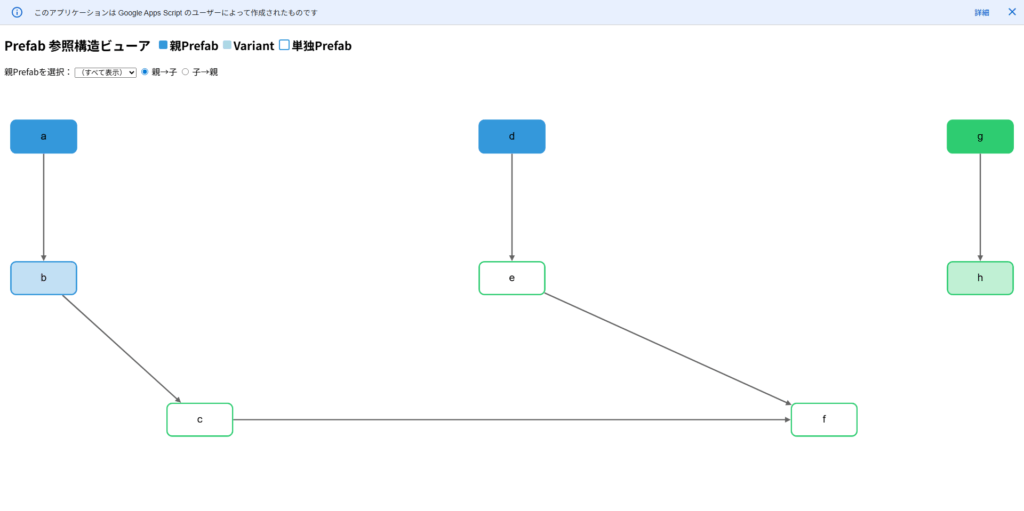
UnityのPrefab参照構造をノード形式で可視化するアセットは既に存在しますが、GoogleスプレッドシートやGoogle Apps Script(GAS)上でも確認できるようにツールを作成しました。
グラフ描画ライブラリのCytoscape.jsを利用してノードを表示しています。
プルダウンからPrefab名を選択すると、関連するPrefabの参照関係が表示されます。
目次
サンプルデータ
UnityのEditorスクリプトを実行し、実際のPrefabデータをCSV形式で書き出します。
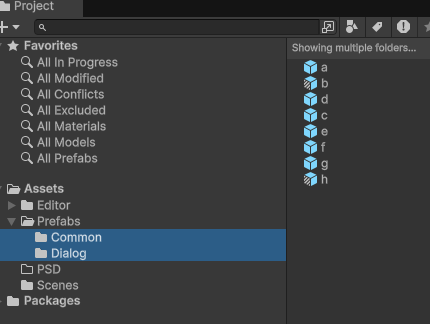
書き出したCSVをGoogleスプレッドシートにインポートしたテーブル情報の例です。
| 親Prefab名 | フォルダ名 | 子Prefab名 | 関係種別 |
|---|---|---|---|
| a | Common | Base | |
| b | Common | a | Nested |
| b | Common | a | Variant |
| c | Dialog | b | Nested |
| d | Common | Base | |
| e | Dialog | d | Nested |
| f | Dialog | c | Nested |
| f | Dialog | e | Nested |
| g | Dialog | Base | |
| h | Dialog | g | Nested |
| h | Dialog | g | Variant |
Prefab参照構造ビューアのコード
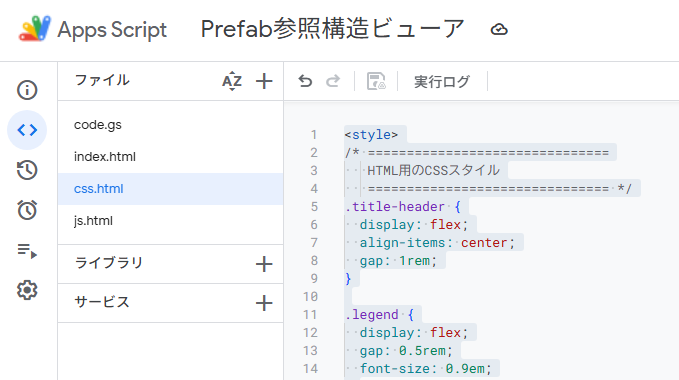
実装に使用した各スクリプトのコードです。
Unityのほかの記事は、まとめからご覧いただけます。
あわせて読みたい

Unityの使い方まとめ|環境設定・uGUI・エディタ拡張
Unityについて書いた記事を、工程別に分類しました。 環境の設定でつまずいている場合は、最初の項目からご覧ください。 各カテゴリーは閲覧数の多い順に表示しています…
ExportPrefabRelationships.cs
Projectウィンドウで対象フォルダを選択し、その階層下にあるPrefabの参照情報をCSVとして書き出します。
/**
 * ExportPrefabRelationships.cs  (Assets/Editor に配置)
 *
 * 選択フォルダ配下の Prefab 依存関係を日時入り CSV で書き出す。
 * 列   : 親Prefab名, フォルダ名, 子Prefab名, 関係種別
 * 種別 : Variant … Variant → Base(+ 疑似 Nested 行)
 *        Nested  … 親 Prefab にネストされている子 Prefab
 *        Base    … ほかの Prefab から参照されるが、自身は何も参照しない Prefab
 *        単独    … 参照関係を一切持たない Prefab
 */

using UnityEngine;
using UnityEditor;
using System;
using System.IO;
using System.Text;
using System.Linq;
using System.Collections.Generic;

public static class ExportPrefabRelationships
{
    private const string MENU = "Tools/選択フォルダのPrefab関係をCSV出力";

    [MenuItem(MENU)]
    private static void Export()
    {
        /* ---------- 1. 選択フォルダ確認 ---------- */
        var roots = Selection.GetFiltered<UnityEngine.Object>(SelectionMode.Assets)
                             .Select(AssetDatabase.GetAssetPath)
                             .Where(AssetDatabase.IsValidFolder)
                             .ToArray();

        if (roots.Length == 0)
        {
            EditorUtility.DisplayDialog("エラー", "Project ウインドウでフォルダを選択してください。", "OK");
            return;
        }

        /* ---------- 2. Prefab 一覧 ---------- */
        string[] prefabGUIDs = AssetDatabase.FindAssets("t:Prefab", roots);
        string[] prefabPaths = prefabGUIDs.Select(AssetDatabase.GUIDToAssetPath).ToArray();
        var pathByName       = prefabPaths.ToDictionary(p => Path.GetFileNameWithoutExtension(p), p => p);

        /* ---------- 3. 結果格納 ---------- */
        var relations = new HashSet<(string parent, string folder, string child, string type)>();

        /* ===== 3-A) Variant → Base ===== */
        foreach (string path in prefabPaths)
        {
            var variantGO = AssetDatabase.LoadAssetAtPath<GameObject>(path);
            if (PrefabUtility.GetPrefabAssetType(variantGO) != PrefabAssetType.Variant) continue;

            var baseGO = PrefabUtility.GetCorrespondingObjectFromSource(variantGO);
            if (baseGO == null) continue;

            string folder      = GetTopFolder(path, roots);
            string variantName = variantGO.name;
            string baseName    = baseGO.name;

            relations.Add((variantName, folder, baseName, "Variant"));
            relations.Add((variantName, folder, baseName, "Nested"));   // 疑似 Nested 行
        }

        /* ===== 3-B) Nested(直下のみ)===== */
        foreach (string parentPath in prefabPaths)
        {
            string parentName = Path.GetFileNameWithoutExtension(parentPath);
            string folderName = GetTopFolder(parentPath, roots);

            var seen = new HashSet<string>(); // 親ごと重複排除

            using var scope = new PrefabScope(parentPath);
            foreach (Transform tr in scope.Root.transform)
            {
                // 子Prefabインスタンスの直下のみ検査(Transform階層1つ下)
                if (!PrefabUtility.IsPartOfPrefabInstance(tr.gameObject)) continue;

                GameObject instRoot = PrefabUtility.GetNearestPrefabInstanceRoot(tr.gameObject);
                if (instRoot == null || instRoot == scope.Root) continue;

                var src = PrefabUtility.GetCorrespondingObjectFromSource(instRoot);
                if (src == null) continue;

                string childName = src.name;
                if (!seen.Add(childName)) continue;

                relations.Add((parentName, folderName, childName, "Nested"));
            }
        }

        /* ===== 3-C) 単独・Base ===== */
        var parents = relations.Select(r => r.parent).ToHashSet();
        var childs  = relations.Select(r => r.child).Where(c => !string.IsNullOrEmpty(c)).ToHashSet();

        foreach (string prefabName in pathByName.Keys)
        {
            bool isParent = parents.Contains(prefabName);
            bool isChild  = childs.Contains(prefabName);

            if (isParent && isChild) continue;                // 親にも子にも出ている → 既に行が存在
            string folder = GetTopFolder(pathByName[prefabName], roots);

            if (!isParent && !isChild)
            {   // 参照を全く持たない
                relations.Add((prefabName, folder, "", "単独"));
            }
            else if (!isParent && isChild)
            {   // 子にしか出てこない(=Base)
                relations.Add((prefabName, folder, "", "Base"));
            }
            // 親のみ(isParent && !isChild)は既に Variant/Nested 行があるので追加不要
        }

        /* ---------- 4. CSV 出力 ---------- */
        var sb = new StringBuilder();
        sb.AppendLine("親Prefab名,フォルダ名,子Prefab名,関係種別");

        foreach (var r in relations
                         .OrderBy(r => r.parent)
                         .ThenBy(r => r.type)
                         .ThenBy(r => r.child))
        {
            sb.AppendLine($"{r.parent},{r.folder},{r.child},{r.type}");
        }

        string ts     = DateTime.Now.ToString("yyyyMMdd_HHmmss");
        string fname  = $"PrefabRelationships_{ts}.csv";
        string saveTo = EditorUtility.SaveFilePanel("CSV を保存", Application.dataPath, fname, "csv");
        if (string.IsNullOrEmpty(saveTo)) return;

        File.WriteAllText(saveTo, sb.ToString(), Encoding.UTF8);
        EditorUtility.RevealInFinder(saveTo);
        Debug.Log($"CSV 出力完了: {saveTo}");
    }

    /* ---------- ルート直下フォルダ名を取得 ---------- */
    private static string GetTopFolder(string prefabPath, string[] roots)
    {
        foreach (string root in roots)
        {
            if (!prefabPath.StartsWith(root)) continue;
            string rel = prefabPath.Substring(root.Length).TrimStart('/');
            string first = rel.Split('/')[0];
            return string.IsNullOrEmpty(first) ? Path.GetFileName(root) : first;
        }
        return Path.GetFileName(Path.GetDirectoryName(prefabPath));
    }

    /* ---------- PrefabContents スコープ ---------- */
    private readonly struct PrefabScope : IDisposable
    {
        public readonly GameObject Root;
        public PrefabScope(string path) => Root = PrefabUtility.LoadPrefabContents(path);
        public void Dispose()           => PrefabUtility.UnloadPrefabContents(Root);
    }
}
続いて、スプレッドシート側に組み込むGASおよびWeb表示用ファイルです。
Code.gs
/* Code.gs  ─ サーバー側ロジック */

function doGet() {
  return HtmlService.createTemplateFromFile('index').evaluate().setTitle('Prefab Viewer');
}
function include(f) { return HtmlService.createHtmlOutputFromFile(f).getContent(); }

/* スプレッドシート → ノード/エッジ構造 */
function getPrefabGraphData() {
  const sh   = SpreadsheetApp.getActive().getSheetByName('シート1');
  const rows = sh.getDataRange().getValues().slice(1);        // ヘッダー除去

  const relPrio = { Base: 3, Variant: 2, Nested: 1 };
  const nodes   = new Map();                                   // id → { id, folder, relation }
  const edges   = [];                                          // { source(child), target(parent) }

  /** ノードを追加/更新
   *  ・フォルダは“最初に付いた値”を優先(Common があとで Dialog に書き換わらない)
   *  ・relation は Base > Variant > Nested 優先 */
  function upsert(id, folder, rel) {
    if (!id) return;
    const ex = nodes.get(id);
    if (!ex) {
      nodes.set(id, { id, folder, relation: rel });
    } else {
      if (ex.folder === 'その他') ex.folder = folder;          // まだ未確定なら書き換え
      if (relPrio[rel] > relPrio[ex.relation]) ex.relation = rel;
    }
  }

  rows.forEach(r => {
    const parent = String(r[0] || '').trim();                  // 親Prefab名
    const folder = String(r[1] || 'その他').trim();            // フォルダ名
    const child  = String(r[2] || '').trim();                  // 子Prefab名
    const rel    = String(r[3] || '').trim();                  // 関係種別

    // 親ノード(自身が Base なら Base、Variant 行なら Variant、通常行なら Nested)
    const parentRel = rel === 'Base' ? 'Base' :
                      rel === 'Variant' ? 'Variant' : 'Nested';
    upsert(parent, folder, parentRel);

    // 子ノード + エッジ(子 → 親)※子フォルダは未知なので「その他」で仮登録
    if (child) {
      const childRel = (rel === 'Variant') ? 'Base' : 'Nested';  // 子は Base(派生元) か Nested
      upsert(child, 'その他', childRel);
      edges.push({ source: child, target: parent });
    }
  });

  return { nodes: [...nodes.values()], edges };
}
index.html
<!DOCTYPE html>
<html>
<head>
  <base target="_top">
  <script src="https://unpkg.com/cytoscape@3.23.0/dist/cytoscape.min.js"></script>
  <!-- 共通ノード/エッジスタイル -->
  <?!= include('css'); ?>
</head>
<body>
  <h2 class="title-header">
    Prefab 参照構造ビューア
    <span class="legend">
      <span class="legend-item">
        <span class="legend-color parent"></span> 親Prefab
      </span>
      <span class="legend-item">
        <span class="legend-color variant"></span> Variant
      </span>
      <span class="legend-item">
        <span class="legend-color standalone"></span> 単独Prefab
      </span>
    </span>
  </h2>

  <!-- プルダウンメニュー -->
  <label for="prefabSelect">親Prefabを選択:</label>
  <select id="prefabSelect">
    <option value="">(すべて表示)</option>
  </select>

  <label><input type="radio" name="direction" value="down" checked> 親→子</label>
  <label><input type="radio" name="direction" value="up"> 子→親</label>

  <div id="cy" class="graph-area"></div>

  <?!= include('js'); ?>
</body>
</html>
js.html
<script>
let fullData = null;
let cy = null;

google.script.run.withSuccessHandler(init).getPrefabGraphData();

function init(data) {
  fullData = data;

  // プルダウン生成
  const prefabNames = [...new Set(data.nodes.map(n => n.id))].sort();
  const select = document.getElementById('prefabSelect');
  prefabNames.forEach(name => {
    const opt = document.createElement('option');
    opt.value = name;
    opt.textContent = name;
    select.appendChild(opt);
  });

  // プルダウン変更時
  select.addEventListener('change', () => {
    drawGraph(select.value);
  });

  // ラジオボタン変更時
  document.querySelectorAll('input[name="direction"]').forEach(r => {
    r.addEventListener('change', () => {
      drawGraph(select.value);
    });
  });

  drawGraph(); // 初期表示
}

function drawGraph(parentFilter = '') {
  const direction = document.querySelector('input[name="direction"]:checked').value;
  const els = [];
  const nodeMap = new Map();
  fullData.nodes.forEach(n => nodeMap.set(n.id, n));

  const targetNodeIds = new Set();

  // 親→子を辿る
  function collectDescendantsOneWay(currentId) {
    if (targetNodeIds.has(currentId)) return;
    targetNodeIds.add(currentId);

    fullData.edges.forEach(e => {
      if (e.source === currentId && !targetNodeIds.has(e.target)) {
        collectDescendantsOneWay(e.target);
      }
    });
  }

  // 子→親を辿る
  function collectAncestorsOneWay(currentId) {
    if (targetNodeIds.has(currentId)) return;
    targetNodeIds.add(currentId);

    fullData.edges.forEach(e => {
      if (e.target === currentId && !targetNodeIds.has(e.source)) {
        collectAncestorsOneWay(e.source);
      }
    });
  }

  if (parentFilter) {
    if (direction === 'down') {
      collectDescendantsOneWay(parentFilter);
    } else {
      collectAncestorsOneWay(parentFilter);
    }
  } else {
    fullData.nodes.forEach(n => targetNodeIds.add(n.id));
  }

  // ノード追加
  targetNodeIds.forEach(id => {
    const n = nodeMap.get(id);
    if (n) els.push({ data: { id: n.id, folder: n.folder, relation: n.relation } });
  });

  // エッジ追加
  const addedEdges = new Set();
  fullData.edges.forEach(e => {
    const key = `${e.source}->${e.target}`;
    if (
      targetNodeIds.has(e.source) &&
      targetNodeIds.has(e.target) &&
      !addedEdges.has(key)
    ) {
      els.push({ data: { source: e.source, target: e.target } });
      addedEdges.add(key);
    }
  });

  // ルート(入力のないノード)特定
  const hasIn = {};
  els.filter(el => el.data.target).forEach(el => hasIn[el.data.target] = true);
  const roots = Array.from(targetNodeIds).filter(id => !hasIn[id]);

  if (cy) cy.destroy();
  cy = cytoscape({
    container: document.getElementById('cy'),
    elements : els,
    layout   : {
      name: 'breadthfirst',
      roots: roots,
      spacingFactor: 1.5,
      padding: 10
    },
    style: window.cyStyle
  });
}
</script>
css.html
<style>
/* ===============================
   HTML用のCSSスタイル
   =============================== */
.title-header {
  display: flex;
  align-items: center;
  gap: 1rem;
}

.legend {
  display: flex;
  gap: 0.5rem;
  font-size: 0.9em;
}

.legend-item {
  display: flex;
  align-items: center;
}

.legend-color {
  width: 16px;
  height: 16px;
  display: inline-block;
  margin-right: 4px;
  border-radius: 3px;
}

.legend-color.parent {
  background-color: #3498db;
}

.legend-color.variant {
  background-color: #add8e6;
}

.legend-color.standalone {
  background-color: white;
  border: 2px solid #3498db;
}

.graph-area {
  width: 100%;
  height: 720px;
  margin-top: 1rem;
}
</style>
<script>
/* ------------------------------------------------------------------
   window.cyStyle : ノード / エッジ共通スタイル
   ------------------------------------------------------------------ */
window.cyStyle = [
  /* デフォルト(Nested 用:枠のみ) */
  {
    selector: 'node',
    style: {
      label: 'data(id)',
      'text-valign': 'center',
      'text-halign': 'center',
      'font-size': '16px',
      shape: 'roundrectangle',
      width: 100,
      height: 50,
      'border-width': 2,
      'border-color': '#000',
      'background-opacity': 0      /* ← 枠のみ */
    }
  },

  /* Base = 不透明塗りつぶし */
  { selector: 'node[relation = "Base"]',
    style: { 'background-opacity': 1 } },

  /* Variant = 半透明塗りつぶし */
  { selector: 'node[relation = "Variant"]',
    style: { 'background-opacity': 0.3 } },

  /* フォルダ別カラー(枠・塗り共通) */
  { selector: 'node[folder = "Common"]',
    style: { 'border-color': '#3498db', 'background-color': '#3498db' } },
  { selector: 'node[folder = "Dialog"]',
    style: { 'border-color': '#2ecc71', 'background-color': '#2ecc71' } },
  { selector: 'node[folder = "その他"]',
    style: { 'border-color': '#95a5a6', 'background-color': '#95a5a6' } },

  /* エッジ */
  { selector: 'edge',
    style: {
      width: 2,
      'line-color': '#666',
      'target-arrow-shape': 'triangle',
      'target-arrow-color': '#666',
      'curve-style': 'bezier'
    }
  }
];
</script>
エディタ拡張の記事は、ほかにもあります。
あわせて読みたい

Unity│選択したフォルダ内のPrefabの情報を書き出すツール
Unityのヒエラルキーやコンポーネント構成は数が増えると確認しづらいため、Prefabから必要な情報だけを抽出してCSVへ書き出すエディタ拡張を作成しました。 指定したフ…
あわせて読みたい

Unity│バッチモードでエディタスクリプトを実行する方法│ヘッドレス
UnityエディターのGUIを起動せず、バッチモード(ヘッドレス)でエディタスクリプトを実行する手順を解説します。 コマンドラインから処理を呼び出すことで、複数のスク…
あわせて読みたい

Unity│UI制作に便利!エディタ拡張まとめ 13選│uGUI
uGUIでのUI制作に役立つエディタ拡張やスクリプトをまとめました。 Photoshop連携、アウトライン描画、文字間隔(カーニング)調整、フォント一括置換など、実際の制作…
あわせて読みたい

Unity│知っておくと便利!エディタ拡張まとめ 9選
エディタ拡張を使うと、Unityに標準搭載されていない独自の機能を追加できます。 開発作業の効率化に役立つおすすめのエディタ拡張を紹介します。 先頭や最後尾に文字を…