Amazonで商品を見るセール会場へ

7-Zip│ZIPファイルをダブルクリックで解凍できるようにする方法

7zip-double-click-extract

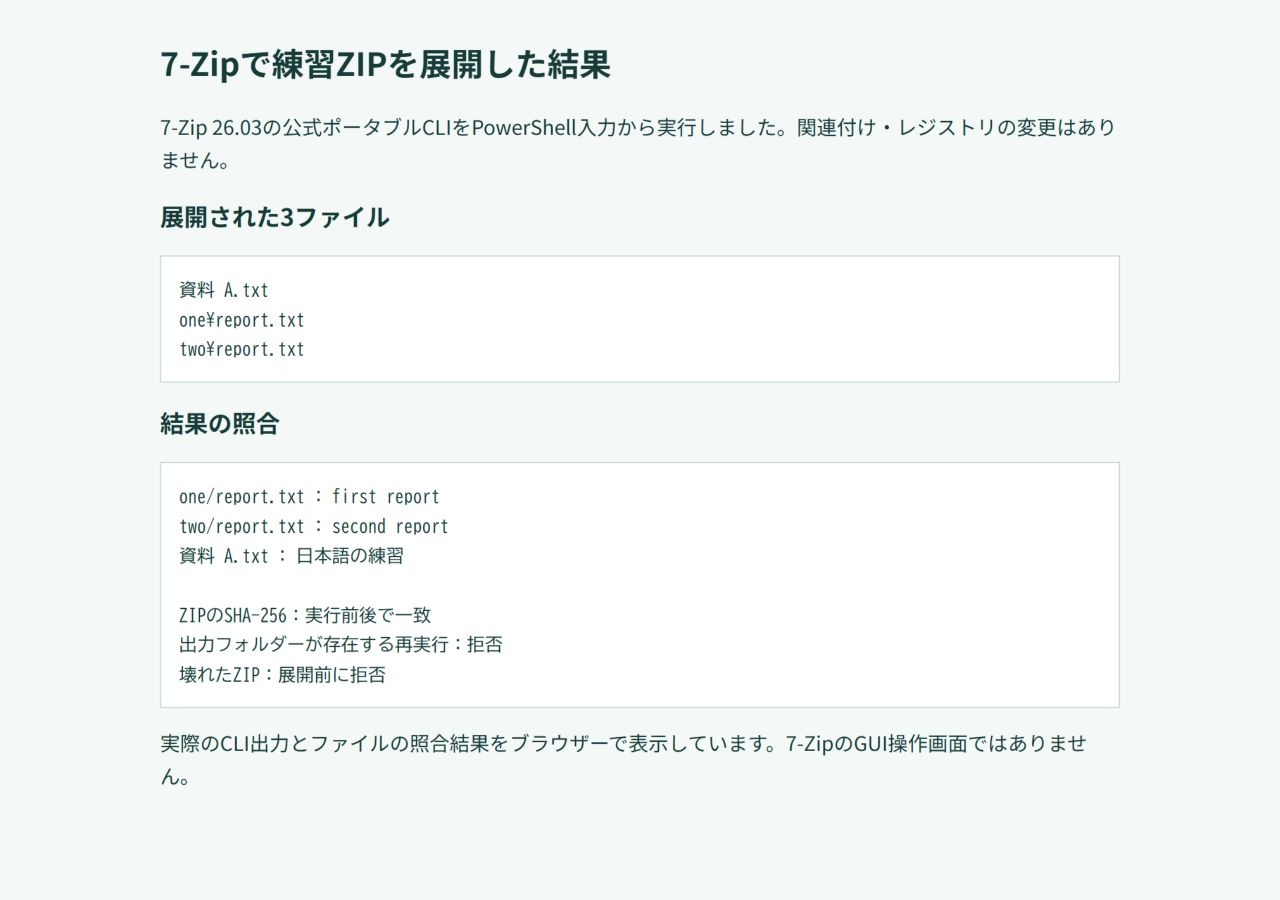
本記事では7-ZipのZIPファイルをダブルクリックですぐに解凍できるようにする方法を紹介します!

設定しておくと便利です!

目次

7-Zipのインストール

下記のURLからソフトをインストールします。

7-Zipの関連付け

ZIPファイルは7ZIPで開くように関連付けておきます。

「7-Zip File Manager」を起動してツール>オプションから各圧縮ファイルを7ZIPに関連付けておきます。

ダブルクリックですぐに解凍できるようにする設定

関連付けた各拡張子のコマンドに「 -o*」を追加してやります。

下記のコードをメモ帳にコピーして7-zip-default-extract.regという名前で保存しましょう。

コード
Windows Registry Editor Version 5.00

[HKEY_CLASSES_ROOT\7-Zip.001\shell]
@="extract"
[HKEY_CLASSES_ROOT\7-Zip.001\shell\extract]
@="Extract to Folder"
[HKEY_CLASSES_ROOT\7-Zip.001\shell\extract\command]
@="\"C:\\Program Files\\7-Zip\\7zG.exe\" x \"%1\" -o*"

[HKEY_CLASSES_ROOT\7-Zip.7z\shell]
@="extract"
[HKEY_CLASSES_ROOT\7-Zip.7z\shell\extract]
@="Extract to Folder"
[HKEY_CLASSES_ROOT\7-Zip.7z\shell\extract\command]
@="\"C:\\Program Files\\7-Zip\\7zG.exe\" x \"%1\" -o*"

[HKEY_CLASSES_ROOT\7-Zip.arj\shell]
@="extract"
[HKEY_CLASSES_ROOT\7-Zip.arj\shell\extract]
@="Extract to Folder"
[HKEY_CLASSES_ROOT\7-Zip.arj\shell\extract\command]
@="\"C:\\Program Files\\7-Zip\\7zG.exe\" x \"%1\" -o*"

[HKEY_CLASSES_ROOT\7-Zip.bz2\shell]
@="extract"
[HKEY_CLASSES_ROOT\7-Zip.bz2\shell\extract]
@="Extract to Folder"
[HKEY_CLASSES_ROOT\7-Zip.bz2\shell\extract\command]
@="\"C:\\Program Files\\7-Zip\\7zG.exe\" x \"%1\" -o*"

[HKEY_CLASSES_ROOT\7-Zip.bzip2\shell]
@="extract"
[HKEY_CLASSES_ROOT\7-Zip.bzip2\shell\extract]
@="Extract to Folder"
[HKEY_CLASSES_ROOT\7-Zip.bzip2\shell\extract\command]
@="\"C:\\Program Files\\7-Zip\\7zG.exe\" x \"%1\" -o*"

[HKEY_CLASSES_ROOT\7-Zip.cab\shell]
@="extract"
[HKEY_CLASSES_ROOT\7-Zip.cab\shell\extract]
@="Extract to Folder"
[HKEY_CLASSES_ROOT\7-Zip.cab\shell\extract\command]
@="\"C:\\Program Files\\7-Zip\\7zG.exe\" x \"%1\" -o*"

[HKEY_CLASSES_ROOT\7-Zip.cpio\shell]
@="extract"
[HKEY_CLASSES_ROOT\7-Zip.cpio\shell\extract]
@="Extract to Folder"
[HKEY_CLASSES_ROOT\7-Zip.cpio\shell\extract\command]
@="\"C:\\Program Files\\7-Zip\\7zG.exe\" x \"%1\" -o*"

[HKEY_CLASSES_ROOT\7-Zip.deb\shell]
@="extract"
[HKEY_CLASSES_ROOT\7-Zip.deb\shell\extract]
@="Extract to Folder"
[HKEY_CLASSES_ROOT\7-Zip.deb\shell\extract\command]
@="\"C:\\Program Files\\7-Zip\\7zG.exe\" x \"%1\" -o*"

[HKEY_CLASSES_ROOT\7-Zip.dmg\shell]
@="extract"
[HKEY_CLASSES_ROOT\7-Zip.dmg\shell\extract]
@="Extract to Folder"
[HKEY_CLASSES_ROOT\7-Zip.dmg\shell\extract\command]
@="\"C:\\Program Files\\7-Zip\\7zG.exe\" x \"%1\" -o*"

[HKEY_CLASSES_ROOT\7-Zip.fat\shell]
@="extract"
[HKEY_CLASSES_ROOT\7-Zip.fat\shell\extract]
@="Extract to Folder"
[HKEY_CLASSES_ROOT\7-Zip.fat\shell\extract\command]
@="\"C:\\Program Files\\7-Zip\\7zG.exe\" x \"%1\" -o*"

[HKEY_CLASSES_ROOT\7-Zip.gz\shell]
@="extract"
[HKEY_CLASSES_ROOT\7-Zip.gz\shell\extract]
@="Extract to Folder"
[HKEY_CLASSES_ROOT\7-Zip.gz\shell\extract\command]
@="\"C:\\Program Files\\7-Zip\\7zG.exe\" x \"%1\" -o*"

[HKEY_CLASSES_ROOT\7-Zip.gzip\shell]
@="extract"
[HKEY_CLASSES_ROOT\7-Zip.gzip\shell\extract]
@="Extract to Folder"
[HKEY_CLASSES_ROOT\7-Zip.gzip\shell\extract\command]
@="\"C:\\Program Files\\7-Zip\\7zG.exe\" x \"%1\" -o*"

[HKEY_CLASSES_ROOT\7-Zip.hfs\shell]
@="extract"
[HKEY_CLASSES_ROOT\7-Zip.hfs\shell\extract]
@="Extract to Folder"
[HKEY_CLASSES_ROOT\7-Zip.hfs\shell\extract\command]
@="\"C:\\Program Files\\7-Zip\\7zG.exe\" x \"%1\" -o*"

[HKEY_CLASSES_ROOT\7-Zip.iso\shell]
@="extract"
[HKEY_CLASSES_ROOT\7-Zip.iso\shell\extract]
@="Extract to Folder"
[HKEY_CLASSES_ROOT\7-Zip.iso\shell\extract\command]
@="\"C:\\Program Files\\7-Zip\\7zG.exe\" x \"%1\" -o*"

[HKEY_CLASSES_ROOT\7-Zip.lha\shell]
@="extract"
[HKEY_CLASSES_ROOT\7-Zip.lha\shell\extract]
@="Extract to Folder"
[HKEY_CLASSES_ROOT\7-Zip.lha\shell\extract\command]
@="\"C:\\Program Files\\7-Zip\\7zG.exe\" x \"%1\" -o*"

[HKEY_CLASSES_ROOT\7-Zip.lzh\shell]
@="extract"
[HKEY_CLASSES_ROOT\7-Zip.lzh\shell\extract]
@="Extract to Folder"
[HKEY_CLASSES_ROOT\7-Zip.lzh\shell\extract\command]
@="\"C:\\Program Files\\7-Zip\\7zG.exe\" x \"%1\" -o*"

[HKEY_CLASSES_ROOT\7-Zip.lzma\shell]
@="extract"
[HKEY_CLASSES_ROOT\7-Zip.lzma\shell\extract]
@="Extract to Folder"
[HKEY_CLASSES_ROOT\7-Zip.lzma\shell\extract\command]
@="\"C:\\Program Files\\7-Zip\\7zG.exe\" x \"%1\" -o*"

[HKEY_CLASSES_ROOT\7-Zip.ntfs\shell]
@="extract"
[HKEY_CLASSES_ROOT\7-Zip.ntfs\shell\extract]
@="Extract to Folder"
[HKEY_CLASSES_ROOT\7-Zip.ntfs\shell\extract\command]
@="\"C:\\Program Files\\7-Zip\\7zG.exe\" x \"%1\" -o*"

[HKEY_CLASSES_ROOT\7-Zip.rar\shell]
@="extract"
[HKEY_CLASSES_ROOT\7-Zip.rar\shell\extract]
@="Extract to Folder"
[HKEY_CLASSES_ROOT\7-Zip.rar\shell\extract\command]
@="\"C:\\Program Files\\7-Zip\\7zG.exe\" x \"%1\" -o*"

[HKEY_CLASSES_ROOT\7-Zip.rpm\shell]
@="extract"
[HKEY_CLASSES_ROOT\7-Zip.rpm\shell\extract]
@="Extract to Folder"
[HKEY_CLASSES_ROOT\7-Zip.rpm\shell\extract\command]
@="\"C:\\Program Files\\7-Zip\\7zG.exe\" x \"%1\" -o*"

[HKEY_CLASSES_ROOT\7-Zip.squashfs\shell]
@="extract"
[HKEY_CLASSES_ROOT\7-Zip.squashfs\shell\extract]
@="Extract to Folder"
[HKEY_CLASSES_ROOT\7-Zip.squashfs\shell\extract\command]
@="\"C:\\Program Files\\7-Zip\\7zG.exe\" x \"%1\" -o*"

[HKEY_CLASSES_ROOT\7-Zip.swm\shell]
@="extract"
[HKEY_CLASSES_ROOT\7-Zip.swm\shell\extract]
@="Extract to Folder"
[HKEY_CLASSES_ROOT\7-Zip.swm\shell\extract\command]
@="\"C:\\Program Files\\7-Zip\\7zG.exe\" x \"%1\" -o*"

[HKEY_CLASSES_ROOT\7-Zip.tar\shell]
@="extract"
[HKEY_CLASSES_ROOT\7-Zip.tar\shell\extract]
@="Extract to Folder"
[HKEY_CLASSES_ROOT\7-Zip.tar\shell\extract\command]
@="\"C:\\Program Files\\7-Zip\\7zG.exe\" x \"%1\" -o*"

[HKEY_CLASSES_ROOT\7-Zip.taz\shell]
@="extract"
[HKEY_CLASSES_ROOT\7-Zip.taz\shell\extract]
@="Extract to Folder"
[HKEY_CLASSES_ROOT\7-Zip.taz\shell\extract\command]
@="\"C:\\Program Files\\7-Zip\\7zG.exe\" x \"%1\" -o*"

[HKEY_CLASSES_ROOT\7-Zip.tbz\shell]
@="extract"
[HKEY_CLASSES_ROOT\7-Zip.tbz\shell\extract]
@="Extract to Folder"
[HKEY_CLASSES_ROOT\7-Zip.tbz\shell\extract\command]
@="\"C:\\Program Files\\7-Zip\\7zG.exe\" x \"%1\" -o*"

[HKEY_CLASSES_ROOT\7-Zip.tbz2\shell]
@="extract"
[HKEY_CLASSES_ROOT\7-Zip.tbz2\shell\extract]
@="Extract to Folder"
[HKEY_CLASSES_ROOT\7-Zip.tbz2\shell\extract\command]
@="\"C:\\Program Files\\7-Zip\\7zG.exe\" x \"%1\" -o*"

[HKEY_CLASSES_ROOT\7-Zip.tgz\shell]
@="extract"
[HKEY_CLASSES_ROOT\7-Zip.tgz\shell\extract]
@="Extract to Folder"
[HKEY_CLASSES_ROOT\7-Zip.tgz\shell\extract\command]
@="\"C:\\Program Files\\7-Zip\\7zG.exe\" x \"%1\" -o*"

[HKEY_CLASSES_ROOT\7-Zip.tpz\shell]
@="extract"
[HKEY_CLASSES_ROOT\7-Zip.tpz\shell\extract]
@="Extract to Folder"
[HKEY_CLASSES_ROOT\7-Zip.tpz\shell\extract\command]
@="\"C:\\Program Files\\7-Zip\\7zG.exe\" x \"%1\" -o*"

[HKEY_CLASSES_ROOT\7-Zip.txz\shell]
@="extract"
[HKEY_CLASSES_ROOT\7-Zip.txz\shell\extract]
@="Extract to Folder"
[HKEY_CLASSES_ROOT\7-Zip.txz\shell\extract\command]
@="\"C:\\Program Files\\7-Zip\\7zG.exe\" x \"%1\" -o*"

[HKEY_CLASSES_ROOT\7-Zip.vhd\shell]
@="extract"
[HKEY_CLASSES_ROOT\7-Zip.vhd\shell\extract]
@="Extract to Folder"
[HKEY_CLASSES_ROOT\7-Zip.vhd\shell\extract\command]
@="\"C:\\Program Files\\7-Zip\\7zG.exe\" x \"%1\" -o*"

[HKEY_CLASSES_ROOT\7-Zip.wim\shell]
@="extract"
[HKEY_CLASSES_ROOT\7-Zip.wim\shell\extract]
@="Extract to Folder"
[HKEY_CLASSES_ROOT\7-Zip.wim\shell\extract\command]
@="\"C:\\Program Files\\7-Zip\\7zG.exe\" x \"%1\" -o*"

[HKEY_CLASSES_ROOT\7-Zip.xar\shell]
@="extract"
[HKEY_CLASSES_ROOT\7-Zip.xar\shell\extract]
@="Extract to Folder"
[HKEY_CLASSES_ROOT\7-Zip.xar\shell\extract\command]
@="\"C:\\Program Files\\7-Zip\\7zG.exe\" x \"%1\" -o*"

[HKEY_CLASSES_ROOT\7-Zip.xz\shell]
@="extract"
[HKEY_CLASSES_ROOT\7-Zip.xz\shell\extract]
@="Extract to Folder"
[HKEY_CLASSES_ROOT\7-Zip.xz\shell\extract\command]
@="\"C:\\Program Files\\7-Zip\\7zG.exe\" x \"%1\" -o*"

[HKEY_CLASSES_ROOT\7-Zip.z\shell]
@="extract"
[HKEY_CLASSES_ROOT\7-Zip.z\shell\extract]
@="Extract to Folder"
[HKEY_CLASSES_ROOT\7-Zip.z\shell\extract\command]
@="\"C:\\Program Files\\7-Zip\\7zG.exe\" x \"%1\" -o*"

[HKEY_CLASSES_ROOT\7-Zip.zip\shell]
@="extract"
[HKEY_CLASSES_ROOT\7-Zip.zip\shell\extract]
@="Extract to Folder"
[HKEY_CLASSES_ROOT\7-Zip.zip\shell\extract\command]
@="\"C:\\Program Files\\7-Zip\\7zG.exe\" x \"%1\" -o*"

あとは7-zip-default-extract.regをダブルクリックして実行するとレジストリが変更されます。

以上で7-zipがダブルクリックで解凍できるようになります。

仕事が捗るほかのツールは、まとめからご覧いただけます。

画像をまとめて圧縮したい場合はこちらです。

まとめ

7-Zipは圧縮率も高く、おすすめの圧縮・解凍ソフトでした。

ただしいまいち使い勝手が悪かったので、すぐに解凍できるように設定してみました。

ぜひお試しください!

作業効率を上げる本と、デスク周りの機材

道具を変えるだけで戻ってくる時間があります。考え方の本と、実際に効いた機材をまとめました。

仕事の進め方を学べる本

\Amazonで商品を見る/
Amazon
\楽天市場で商品を見る/
楽天市場
\Yahoo!ショッピングで商品を見る/
Yahooショッピング
\メルカリで商品を見る/
メルカリ
同文舘出版
¥1,870 (2026/09/15 21:00時点 | Amazon調べ)
\Amazonで商品を見る/
Amazon
\楽天市場で商品を見る/
楽天市場
\Yahoo!ショッピングで商品を見る/
Yahooショッピング
\メルカリで商品を見る/
メルカリ
\Amazonで商品を見る/
Amazon
\楽天市場で商品を見る/
楽天市場
\Yahoo!ショッピングで商品を見る/
Yahooショッピング
\メルカリで商品を見る/
メルカリ

デスク周りの機材

\Amazonで商品を見る/
Amazon
\楽天市場で商品を見る/
楽天市場
\Yahoo!ショッピングで商品を見る/
Yahooショッピング
\メルカリで商品を見る/
メルカリ
\Amazonで商品を見る/
Amazon
\楽天市場で商品を見る/
楽天市場
\Yahoo!ショッピングで商品を見る/
Yahooショッピング
\メルカリで商品を見る/
メルカリ
\Amazonで商品を見る/
Amazon
\楽天市場で商品を見る/
楽天市場
\Yahoo!ショッピングで商品を見る/
Yahooショッピング
\メルカリで商品を見る/
メルカリ

選び方をもっと詳しく

よかったらシェアしてね!
  • URLをコピーしました!
  • URLをコピーしました!
目次