JiraのREST APIとGoogle Apps Script(GAS)を活用し、Googleスプレッドシートの行データからJiraのタスクを一括登録する手順を解説します。
課題を1件ずつ手動登録せず、シート上でリスト化してスクリプトから自動作成することで作業工数を削減できます。

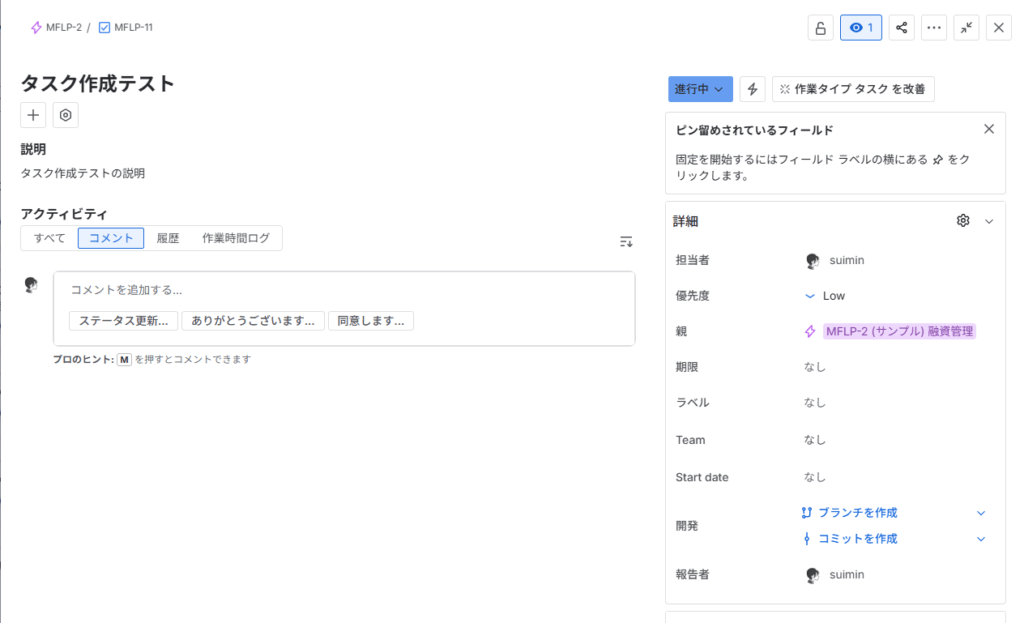
作成されたJiraタスクの確認画面。

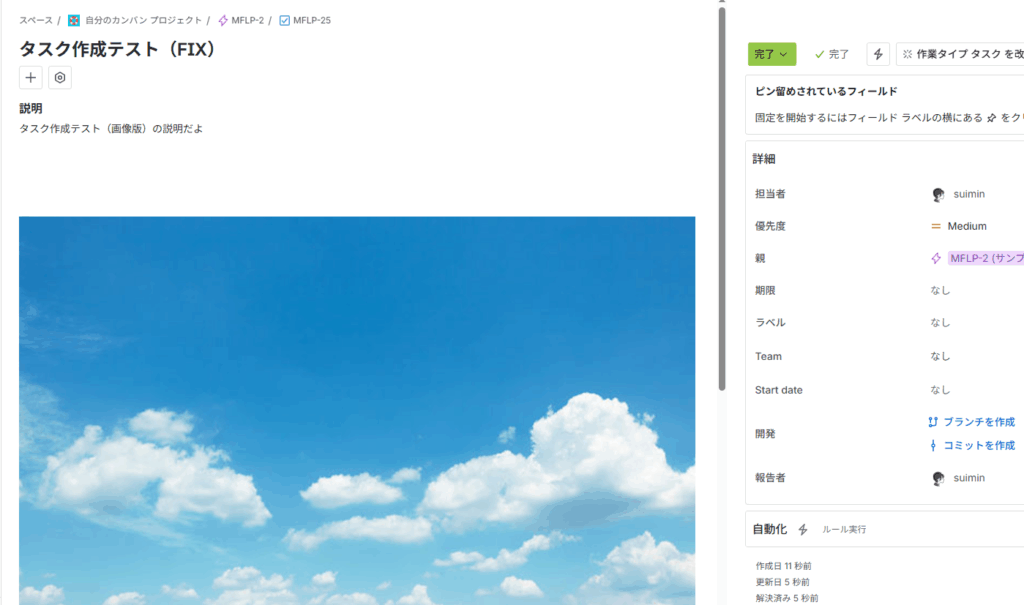
スプレッドシート上の画像データをJiraタスクの説明欄へ埋め込む指定にも対応しています。


事前準備:連携に必要な3つのJira情報を確認する
GASからJira APIへ認証リクエストを送るため、事前に以下の3項目を用意します。
1. Jira CloudのURL
利用中のAtlassian組織またはプロジェクトでアクセスするベースURLです。
例: https://xxxxx.atlassian.net
2. Jiraログイン用メールアドレス
Jiraアカウントに登録しているログイン用メールアドレスを使用します。
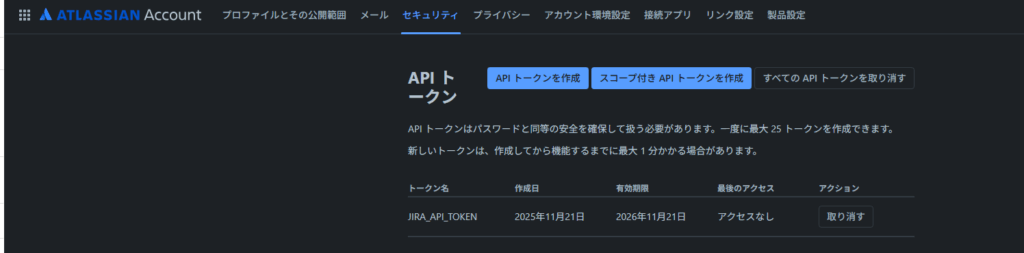
3. Jira APIトークン
- Atlassianアカウントへログイン
- 右上のプロフィールアイコンから「アカウント設定」→「セキュリティ」→「APIトークン」の順に開く
- 「APIトークンを作成」を選択し、ラベルを指定して新規作成
- 生成されたトークン文字列をコピー(再表示できないため控えておく)
これでAPI連携に必要な認証情報が揃いました。

GASの設定(スクリプトプロパティの登録)
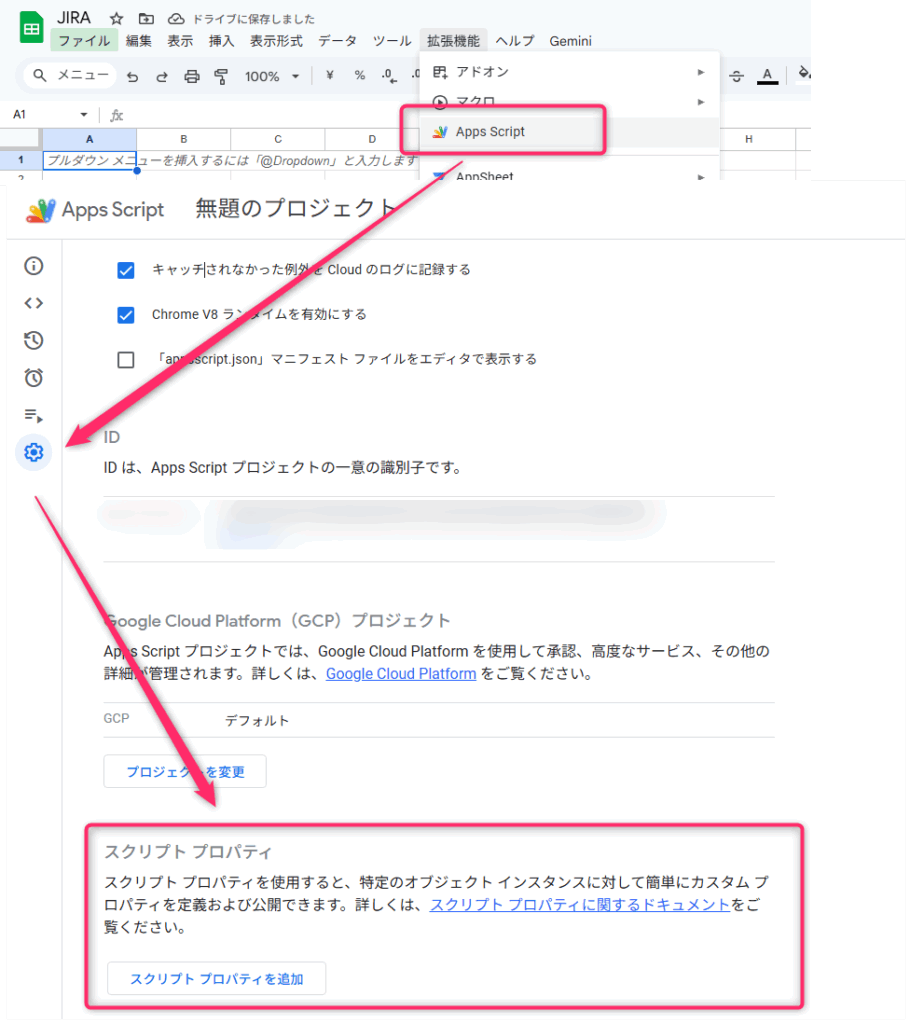
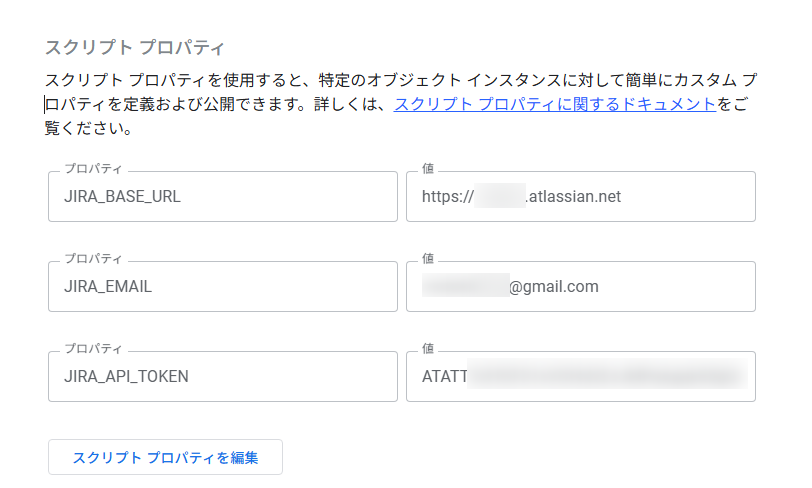
スプレッドシートの「拡張機能」→「Apps Script」を開き、プロジェクト設定からスクリプトプロパティを追加します。

| プロパティ名 | 値の例 |
|---|---|
| JIRA_BASE_URL | https://xxxxx.atlassian.net |
| JIRA_EMAIL | あなたのメールアドレス |
| JIRA_API_TOKEN | 取得したAPIトークン文字列 |
認証情報をハードコードせずスクリプトプロパティへ保存することで、安全にAPIを呼び出せます。

続いて、シート側に登録用データを記述して実行準備を行います。
シートのフォーマットとタスク登録の実行
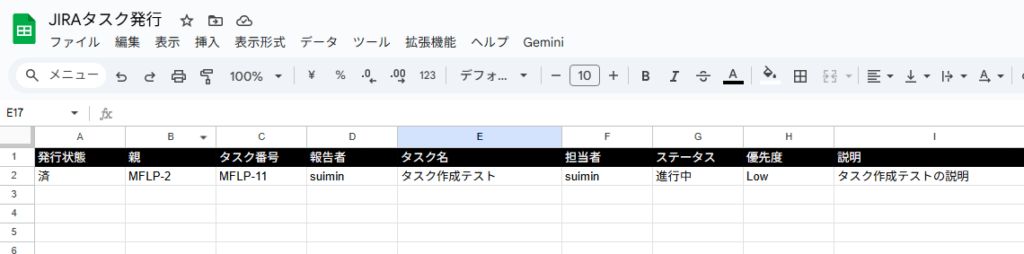
対象シート(例: シート1)に各列の見出しと作成したいタスクの値を入力します。
| 発行状態 | 親 | タスク番号 | 報告者 | タスク名 | 担当者 | ステータス | 優先度 | 説明 |
|---|---|---|---|---|---|---|---|---|
| MFLP-2 | yamada | タスク作成テスト | tanaka | 進行中 | Low | タスク作成テストの説明 |
スクリプトエディタに対象のコードを貼り付け、関数publishJiraTasksFromSheet()を選択して実行します。
Googleスプレッドシートの関連操作や応用事例は、関連記事のまとめをご確認ください。

コード側で参照するシート名が「シート1」以外の場合は、定数定義のシート名を実際の名称に合わせて修正してください。
const sheet = ss.getSheetByName('シート1') || ss.getActiveSheet();
/************************************************
* Jira タスク発行スクリプト
* (エピック紐付け + 担当者 + ステータス + 優先度
*
* シート構成(シート1)
* A: 発行状態 (空 / 済)
* B: 親 (エピックキー: 例 MFLP-2)
* C: タスク番号(Jira Issueキー)
* D: 報告者 (未使用)
* E: タスク名 (summary)
* F: 担当者 (Jiraの表示名: 例 suimin)
* G: ステータス (To Do / 進行中 / レビュー中 / 完了)
* H: 優先度 (Highest / High / Medium / Low / Lowest)
* I: 説明 (テキスト)
************************************************/
/* ========================
共通
======================== */
function getJiraConfig() {
const props = PropertiesService.getScriptProperties();
const baseUrl = props.getProperty('JIRA_BASE_URL');
const email = props.getProperty('JIRA_EMAIL');
const apiToken = props.getProperty('JIRA_API_TOKEN');
if (!baseUrl || !email || !apiToken) {
throw new Error('Jira接続情報が設定されていません。');
}
return { baseUrl, email, apiToken };
}
/**
* キーをHYPERLINKに変換してセルへセット
*/
function setJiraLinkToCell_(sheet, row, col, issueKey) {
if (!issueKey) return;
const config = getJiraConfig();
const url = config.baseUrl.replace(/\/$/, '') + '/browse/' + issueKey;
sheet.getRange(row, col).setFormula(
`=HYPERLINK("${url}","${issueKey}")`
);
}
/* ========================
ユーザー検索(担当者)
======================== */
function findAccountIdByExactDisplayName_(displayName) {
const config = getJiraConfig();
const url = config.baseUrl + '/rest/api/3/user/search?query=' +
encodeURIComponent(displayName);
const res = UrlFetchApp.fetch(url, {
method: 'get',
headers: {
Authorization: 'Basic ' +
Utilities.base64Encode(config.email + ':' + config.apiToken)
},
muteHttpExceptions: true
});
if (res.getResponseCode() >= 300) {
Logger.log('ユーザー検索エラー: ' + res.getContentText());
return '';
}
const users = JSON.parse(res.getContentText());
for (const user of users) {
if (user.displayName === displayName) return user.accountId;
}
return '';
}
/* ========================
ステータス遷移
======================== */
/**
* G列のステータス名(「レビュー中」「進行中」「完了」など)に遷移させる
*/
function transitionIssueStatus(issueKey, targetStatusName) {
if (!targetStatusName) return;
const config = getJiraConfig();
const url = config.baseUrl + '/rest/api/3/issue/' +
encodeURIComponent(issueKey) + '/transitions';
const headers = {
Authorization: 'Basic ' +
Utilities.base64Encode(config.email + ':' + config.apiToken),
Accept: 'application/json',
'Content-Type': 'application/json'
};
// 利用可能な遷移一覧を取得
const listRes = UrlFetchApp.fetch(url, {
method: 'get',
headers: headers,
muteHttpExceptions: true
});
const listCode = listRes.getResponseCode();
const listBody = listRes.getContentText();
if (listCode < 200 || listCode >= 300) {
Logger.log('ステータス取得失敗 issue=' + issueKey +
' code=' + listCode + ' body=' + listBody);
return;
}
const listJson = JSON.parse(listBody);
const transitions = listJson.transitions || [];
// UI上のステータス名(t.to.name)で一致を探す
const trans = transitions.find(t =>
t.to && t.to.name === targetStatusName
) || transitions.find(t =>
t.name === targetStatusName
);
if (!trans) {
Logger.log('ステータス "' + targetStatusName +
'" への遷移が見つかりません(issue=' + issueKey + ')');
return;
}
const payload = {
transition: { id: trans.id }
};
const doRes = UrlFetchApp.fetch(url, {
method: 'post',
headers: headers,
payload: JSON.stringify(payload),
muteHttpExceptions: true
});
const doCode = doRes.getResponseCode();
const doBody = doRes.getContentText();
if (doCode >= 200 && doCode < 300) {
Logger.log('ステータス変更成功 issue=' + issueKey +
' -> ' + targetStatusName);
} else {
Logger.log('ステータス変更失敗 issue=' + issueKey +
' code=' + doCode + ' body=' + doBody);
}
}
/* ========================
Jira Issue作成
======================== */
function createJiraIssue(summary, descriptionText, epicKey,
assigneeRaw, priorityName, statusName) {
const config = getJiraConfig();
const projectKey = epicKey ? String(epicKey).split('-')[0] : 'MFLP';
const fields = {
project: { key: projectKey },
summary: summary,
issuetype: { name: 'Task' },
description: {
type: 'doc',
version: 1,
content: [{
type: 'paragraph',
content: descriptionText
? [{ type: 'text', text: String(descriptionText) }]
: []
}]
}
};
// 親エピック
if (epicKey) fields.parent = { key: epicKey };
// 担当者
if (assigneeRaw) {
const id = findAccountIdByExactDisplayName_(assigneeRaw);
if (id) {
fields.assignee = { accountId: id };
} else {
Logger.log('WARN: 担当者 "%s" の accountId が見つからず未割当', assigneeRaw);
}
}
// 優先度
if (priorityName) {
fields.priority = { name: priorityName };
}
// Issue作成
const createRes = UrlFetchApp.fetch(config.baseUrl + '/rest/api/3/issue', {
method: 'post',
headers: {
Authorization: 'Basic ' +
Utilities.base64Encode(config.email + ':' + config.apiToken),
'Content-Type': 'application/json',
Accept: 'application/json'
},
payload: JSON.stringify({ fields }),
muteHttpExceptions: true
});
const createCode = createRes.getResponseCode();
const createBody = createRes.getContentText();
if (createCode < 200 || createCode >= 300) {
Logger.log('Jira Issue作成エラー code=' + createCode + ' body=' + createBody);
throw new Error('Issue作成失敗');
}
const issueKey = JSON.parse(createBody).key;
Logger.log('Issue作成成功: ' + issueKey);
// ステータスが指定されていれば遷移
if (statusName) {
transitionIssueStatus(issueKey, statusName);
}
return issueKey;
}
/* ========================
実行本体
======================== */
function publishJiraTasksFromSheet() {
const sheet = SpreadsheetApp.getActiveSpreadsheet().getSheetByName('シート1');
const lastRow = sheet.getLastRow();
for (let r = 2; r <= lastRow; r++) {
const 発行状態 = sheet.getRange(r, 1).getValue();
if (発行状態 === '済') continue;
const 親 = sheet.getRange(r, 2).getValue(); // B: 親エピック
const タスク名 = sheet.getRange(r, 5).getValue(); // E: タスク名
if (!タスク名) continue;
const 担当者 = sheet.getRange(r, 6).getValue(); // F
const ステータス = sheet.getRange(r, 7).getValue(); // G
const 優先度 = sheet.getRange(r, 8).getValue(); // H
const 説明 = sheet.getRange(r, 9).getValue(); // I: 説明
try {
const issueKey = createJiraIssue(
タスク名, 説明, 親,
担当者, 優先度, ステータス
);
// A列: 発行済に
sheet.getRange(r, 1).setValue('済');
// B列: 親エピックをリンク化(元の値がキー前提)
if (親) setJiraLinkToCell_(sheet, r, 2, 親);
// C列: タスクキーをリンク化
setJiraLinkToCell_(sheet, r, 3, issueKey);
} catch (e) {
Logger.log('行 ' + r + ' エラー: ' + e.message);
}
}
}
スクリプトの処理が完了すると、Jira上に指定した内容でタスクが登録されます。

実行完了後のスプレッドシート。

応用:説明欄に画像を添付・挿入する方法
J列のセル内に配置した画像データを読み込み、Jiraタスクの説明フィールドへ埋め込んで登録できます。


/************************************************
* Jira タスク発行スクリプト(リファクタ版)
*
* 機能:
* - エピック紐付け(B列のキーを parent に設定)
* - 担当者(表示名 → accountId)を割り当て
* - ステータス遷移(G列: To Do / 進行中 / レビュー中 / 完了)
* - 優先度設定(H列: Highest / High / Medium / Low / Lowest)
* - 説明(I列テキスト)+ 末尾に画像(J列セル内画像)を inline 埋め込み
* - B/C列を /browse/キー のハイパーリンクに更新
*
* シート構成(シート1)
* A: 発行状態 (空 / 済)
* B: 親 (エピックキー: 例 MFLP-2)
* C: タスク番号(Jira Issueキー)
* D: 報告者 (未使用)
* E: タスク名 (summary)
* F: 担当者 (Jiraの表示名: 例 suimin)
* G: ステータス (To Do / 進行中 / レビュー中 / 完了)
* H: 優先度 (Highest / High / Medium / Low / Lowest)
* I: 説明 (テキスト)
* J: 画像 (セル内画像 or =IMAGE())
************************************************/
// 初期ステータス名(これのときは遷移しない)
const JIRA_INITIAL_STATUS_NAME = 'To Do';
/* ========================
* 共通ユーティリティ
* ====================== */
/**
* スクリプトプロパティから Jira 接続情報を取得
*/
function getJiraConfig() {
const props = PropertiesService.getScriptProperties();
let baseUrl = props.getProperty('JIRA_BASE_URL');
const email = props.getProperty('JIRA_EMAIL');
const apiToken = props.getProperty('JIRA_API_TOKEN');
if (!baseUrl || !email || !apiToken) {
throw new Error('Jira接続情報(JIRA_BASE_URL / JIRA_EMAIL / JIRA_API_TOKEN)が設定されていません。');
}
// 末尾の / は統一して削除
baseUrl = baseUrl.replace(/\/$/, '');
return { baseUrl, email, apiToken };
}
/**
* Basic認証ヘッダー文字列を生成
*/
function buildBasicAuth_(email, apiToken) {
return 'Basic ' + Utilities.base64Encode(email + ':' + apiToken);
}
/**
* /browse/キー のハイパーリンクをセルにセット
*/
function setJiraLinkToCell_(sheet, row, col, issueKey) {
if (!issueKey) return;
const config = getJiraConfig();
const url = config.baseUrl + '/browse/' + issueKey;
sheet.getRange(row, col).setFormula(
`=HYPERLINK("${url}","${issueKey}")`
);
}
/* ========================
* ユーザー検索(担当者)
* ====================== */
/**
* 表示名から Jira の accountId を取得(完全一致)
*/
function findAccountIdByExactDisplayName_(displayName) {
const config = getJiraConfig();
const url = config.baseUrl + '/rest/api/3/user/search?query=' +
encodeURIComponent(displayName);
const res = UrlFetchApp.fetch(url, {
method: 'get',
headers: {
Authorization: buildBasicAuth_(config.email, config.apiToken)
},
muteHttpExceptions: true
});
const code = res.getResponseCode();
const body = res.getContentText();
if (code >= 300) {
Logger.log('ユーザー検索エラー code=%s body=%s', code, body);
return '';
}
const users = JSON.parse(body);
for (const user of users) {
if (user.displayName === displayName) return user.accountId;
}
return '';
}
/* ========================
* 画像処理(J列セル内画像)
* ====================== */
/**
* J列セルから画像Blobを取得(CellImage or =IMAGE("URL"))
*/
function getImageBlobFromCell_(cell) {
const v = cell.getValue();
const formula = cell.getFormula();
const hasGetContentUrl = v && typeof v.getContentUrl === 'function';
const valueType = v && v.valueType;
Logger.log(
'getImageBlobFromCell_: value=%s, valueType=%s, hasGetContentUrl=%s, formula=%s',
v, valueType, hasGetContentUrl, formula
);
// ① CellImage(セル内埋め込み画像)
if (v && (valueType === SpreadsheetApp.ValueType.IMAGE || hasGetContentUrl)) {
try {
const url = v.getContentUrl && v.getContentUrl();
if (!url) {
Logger.log('CellImage: contentUrl が空です');
return null;
}
const res = UrlFetchApp.fetch(url, {
headers: { Authorization: 'Bearer ' + ScriptApp.getOAuthToken() },
muteHttpExceptions: true
});
const code = res.getResponseCode();
if (code < 200 || code >= 300) {
Logger.log(
'CellImage取得失敗 code=%s body=%s',
code, res.getContentText()
);
return null;
}
const blob = res.getBlob().setName('sheet-image.png');
Logger.log(
'CellImage取得成功 size=%s type=%s',
blob.getBytes().length, blob.getContentType()
);
return blob;
} catch (e) {
Logger.log('CellImage取得例外: %s', e);
return null;
}
}
// ② =IMAGE("URL") にも対応
if (formula && /^=IMAGE\(/i.test(formula)) {
const m = formula.match(/IMAGE\("(.+?)"/i);
if (m && m[1]) {
const imageUrl = m[1];
Logger.log('IMAGE関数検出: %s', imageUrl);
try {
const res = UrlFetchApp.fetch(imageUrl, { muteHttpExceptions: true });
const code = res.getResponseCode();
if (code >= 200 && code < 300) {
const blob = res.getBlob().setName('sheet-image.png');
Logger.log(
'IMAGE関数画像取得成功 size=%s type=%s',
blob.getBytes().length, blob.getContentType()
);
return blob;
} else {
Logger.log(
'IMAGE関数画像取得失敗 code=%s body=%s',
code, res.getContentText()
);
}
} catch (e) {
Logger.log('IMAGE関数画像取得例外: %s', e);
}
}
}
Logger.log('画像なし or 未対応形式のセルです');
return null;
}
/**
* 添付アップロード → mediaId を取得して返す
*
* 戻り値: { attachmentId, mediaId, filename } または null
*/
function uploadAttachmentAndGetMedia_(issueKey, blob) {
if (!blob) return null;
const config = getJiraConfig();
const attachUrl = config.baseUrl +
'/rest/api/3/issue/' + encodeURIComponent(issueKey) + '/attachments';
// 1) 添付をアップロード
const res = UrlFetchApp.fetch(attachUrl, {
method: 'post',
headers: {
Authorization: buildBasicAuth_(config.email, config.apiToken),
'X-Atlassian-Token': 'no-check',
Accept: 'application/json'
},
payload: { file: blob },
muteHttpExceptions: true
});
const code = res.getResponseCode();
const body = res.getContentText();
if (code < 200 || code >= 300) {
Logger.log(
'添付アップロード失敗 issue=%s code=%s body=%s',
issueKey, code, body
);
return null;
}
const arr = JSON.parse(body) || [];
const att = arr[0];
if (!att) {
Logger.log('添付レスポンスに添付情報がありません issue=%s', issueKey);
return null;
}
Logger.log(
'添付アップロード成功 issue=%s id=%s filename=%s',
issueKey, att.id, att.filename
);
// 2) mediaId を取得する
// att.content 例: "/rest/api/3/attachment/content/12345"
const contentPath = att.content;
if (!contentPath) {
Logger.log('attachment.content が空です issue=%s', issueKey);
return null;
}
const contentUrl = contentPath.startsWith('http')
? contentPath
: config.baseUrl + contentPath;
// Location ヘッダから /file/<mediaId>/binary の mediaId を抜く
const res2 = UrlFetchApp.fetch(contentUrl, {
method: 'get',
headers: {
Authorization: buildBasicAuth_(config.email, config.apiToken)
},
followRedirects: false,
muteHttpExceptions: true
});
const code2 = res2.getResponseCode();
const headers = res2.getHeaders();
const loc = headers.Location || headers.location;
Logger.log(
'attachment.content GET code=%s Location=%s',
code2, loc
);
if (!loc) {
Logger.log('Locationヘッダが取得できません headers=%s', JSON.stringify(headers));
return null;
}
// 例: https://api.media.atlassian.com/file/<mediaId>/binary?...
const m = String(loc).match(/\/file\/([^\/]+)\//);
if (!m) {
Logger.log('mediaId抽出失敗 location=%s', loc);
return null;
}
const mediaId = m[1];
Logger.log('mediaId取得成功 mediaId=%s', mediaId);
return {
attachmentId: String(att.id),
mediaId: mediaId,
filename: att.filename
};
}
/* ========================
* 説明ADF(テキスト + inline画像)
* ====================== */
/**
* 説明テキスト + mediaId の画像を末尾に埋め込む ADF を生成
*/
function buildDescriptionADF_(descriptionText, mediaId) {
const content = [];
// 1行目:説明テキスト
content.push({
type: 'paragraph',
content: descriptionText
? [{ type: 'text', text: String(descriptionText) }]
: []
});
// 2行目:inline画像
if (mediaId) {
content.push({
type: 'mediaSingle',
attrs: {
layout: 'align-start',
width: 100.0
},
content: [{
type: 'media',
attrs: {
id: mediaId, // /file/<mediaId>/binary の mediaId
type: 'file',
collection: '' // communityの例に合わせて空のまま
}
}]
});
}
const doc = {
type: 'doc',
version: 1,
content: content
};
Logger.log('buildDescriptionADF_ doc=%s', JSON.stringify(doc));
return doc;
}
/* ========================
* ステータス遷移
* ====================== */
/**
* G列のステータス名に遷移させる
* - To Do の場合は新規作成時の初期ステータス想定なので何もしない
*/
function transitionIssueStatus(issueKey, targetStatusName) {
if (!targetStatusName || targetStatusName === JIRA_INITIAL_STATUS_NAME) return;
const config = getJiraConfig();
const url = config.baseUrl + '/rest/api/3/issue/' +
encodeURIComponent(issueKey) + '/transitions';
const headers = {
Authorization: buildBasicAuth_(config.email, config.apiToken),
Accept: 'application/json',
'Content-Type': 'application/json'
};
// 利用可能な遷移一覧取得
const listRes = UrlFetchApp.fetch(url, {
method: 'get',
headers: headers,
muteHttpExceptions: true
});
const listCode = listRes.getResponseCode();
const listBody = listRes.getContentText();
if (listCode < 200 || listCode >= 300) {
Logger.log(
'ステータス取得失敗 issue=%s code=%s body=%s',
issueKey, listCode, listBody
);
return;
}
const listJson = JSON.parse(listBody);
const transitions = listJson.transitions || [];
// t.to.name(UI表示名)でマッチ。なければ t.name も見る
const trans = transitions.find(t =>
t.to && t.to.name === targetStatusName
) || transitions.find(t =>
t.name === targetStatusName
);
if (!trans) {
Logger.log(
'ステータス "%s" への遷移が見つかりません issue=%s',
targetStatusName, issueKey
);
return;
}
const payload = { transition: { id: trans.id } };
const doRes = UrlFetchApp.fetch(url, {
method: 'post',
headers: headers,
payload: JSON.stringify(payload),
muteHttpExceptions: true
});
const doCode = doRes.getResponseCode();
const doBody = doRes.getContentText();
if (doCode >= 200 && doCode < 300) {
Logger.log(
'ステータス変更成功 issue=%s -> %s',
issueKey, targetStatusName
);
} else {
Logger.log(
'ステータス変更失敗 issue=%s code=%s body=%s',
issueKey, doCode, doBody
);
}
}
/* ========================
* Jira Issue 作成
* ====================== */
/**
* Jira にタスクを作成し、必要なら説明を「テキスト + 画像」で上書き
*/
function createJiraIssue(summary, descriptionText, epicKey,
assigneeRaw, priorityName, statusName,
imageBlob) {
const config = getJiraConfig();
const projectKey = epicKey ? String(epicKey).split('-')[0] : 'MFLP';
// まずはテキストだけの description で Issue を作成
const fields = {
project: { key: projectKey },
summary: summary,
issuetype: { name: 'Task' },
description: {
type: 'doc',
version: 1,
content: [{
type: 'paragraph',
content: descriptionText
? [{ type: 'text', text: String(descriptionText) }]
: []
}]
}
};
// 親エピック
if (epicKey) {
fields.parent = { key: epicKey };
}
// 担当者
if (assigneeRaw) {
const id = findAccountIdByExactDisplayName_(assigneeRaw);
if (id) {
fields.assignee = { accountId: id };
} else {
Logger.log('WARN: 担当者 "%s" の accountId が見つからず未割当', assigneeRaw);
}
}
// 優先度
if (priorityName) {
fields.priority = { name: priorityName };
}
// Issue 作成
const createRes = UrlFetchApp.fetch(config.baseUrl + '/rest/api/3/issue', {
method: 'post',
headers: {
Authorization: buildBasicAuth_(config.email, config.apiToken),
'Content-Type': 'application/json',
Accept: 'application/json'
},
payload: JSON.stringify({ fields }),
muteHttpExceptions: true
});
const createCode = createRes.getResponseCode();
const createBody = createRes.getContentText();
if (createCode < 200 || createCode >= 300) {
Logger.log('Jira Issue作成エラー code=%s body=%s', createCode, createBody);
throw new Error('Issue作成失敗');
}
const issueKey = JSON.parse(createBody).key;
Logger.log('Issue作成成功: %s', issueKey);
// 画像があれば: 添付 → mediaId 取得 → description を「テキスト+画像」に更新
if (imageBlob) {
const info = uploadAttachmentAndGetMedia_(issueKey, imageBlob);
if (info && info.mediaId) {
const descADF = buildDescriptionADF_(descriptionText, info.mediaId);
const updateUrl = config.baseUrl + '/rest/api/3/issue/' +
encodeURIComponent(issueKey);
Logger.log('descADF for %s: %s', issueKey, JSON.stringify(descADF));
const updateRes = UrlFetchApp.fetch(updateUrl, {
method: 'put',
headers: {
Authorization: buildBasicAuth_(config.email, config.apiToken),
'Content-Type': 'application/json',
Accept: 'application/json'
},
payload: JSON.stringify({ fields: { description: descADF } }),
muteHttpExceptions: true
});
const upCode = updateRes.getResponseCode();
const upBody = updateRes.getContentText();
if (upCode >= 200 && upCode < 300) {
Logger.log('description 更新成功 issue=%s', issueKey);
} else {
Logger.log(
'description 更新失敗 issue=%s code=%s body=%s',
issueKey, upCode, upBody
);
}
} else {
Logger.log('mediaId なし: description 埋め込みスキップ issue=%s', issueKey);
}
}
// ステータス遷移(To Do 以外が指定されている場合)
if (statusName) {
transitionIssueStatus(issueKey, statusName);
}
return issueKey;
}
/* ========================
* 実行本体
* ====================== */
/**
* シート1の行を走査して Jira Issue を発行
* - A列が「済」の行はスキップ
* - E列(タスク名)が空の行もスキップ
* - 成功した行は A列=済 / B,C列リンク化
*/
function publishJiraTasksFromSheet() {
const sheet = SpreadsheetApp.getActiveSpreadsheet().getSheetByName('シート1');
const lastRow = sheet.getLastRow();
if (!sheet || lastRow < 2) {
Logger.log('対象データ行がありません');
return;
}
for (let r = 2; r <= lastRow; r++) {
const 発行状態 = sheet.getRange(r,1).getValue();
if (発行状態 === '済') continue;
const 親 = sheet.getRange(r,2).getValue(); // B: 親エピック
const タスク名 = sheet.getRange(r,5).getValue(); // E: タスク名
if (!タスク名) continue;
const 担当者 = sheet.getRange(r,6).getValue(); // F
const ステータス = sheet.getRange(r,7).getValue(); // G
const 優先度 = sheet.getRange(r,8).getValue(); // H
const 説明 = sheet.getRange(r,9).getValue(); // I: 説明
const imageBlob = getImageBlobFromCell_(sheet.getRange(r,10)); // J: 画像
try {
const issueKey = createJiraIssue(
タスク名, 説明, 親,
担当者, 優先度, ステータス, imageBlob
);
// A列: 発行済
sheet.getRange(r,1).setValue('済');
// B列: 親エピックリンク
if (親) setJiraLinkToCell_(sheet, r, 2, 親);
// C列: タスクリンク
setJiraLinkToCell_(sheet, r, 3, issueKey);
} catch (e) {
Logger.log('行 %s でエラー: %s', r, e.message);
// A列は空のままにして、後で再実行できるようにする
}
}
}
この記事で紹介しているコードは、GitHubのMOTOKI-LLC/cg-method-codeにもまとめています。
外部のサービスと連携する記事は、ほかにもあります。