
AIファイルをドラッグ&ドロップしてVBScriptからIllustratorを動かす旧方式は、外部ランチャー、Illustratorへの自動化呼び出し、JSXの3段階で構成されます。この記事は構成を説明する旧方式の資料として残し、新しい一括処理にはIllustrator内から実行するJSXを案内します。
2026年10月19日に、Illustrator 2026(30.8.2)とWindows 11 Pro(10.0.26200)で代替の手順を実行し、結果を「Illustrator 2026で代替手順を実行した結果」にまとめました。
旧方式の構成
| 段階 | 役割 | 確認が必要な点 |
|---|---|---|
| VBSランチャー | ドロップしたファイルのパスを受け取る | 拡張子、複数パス、引用符、フォルダーの扱い |
| 外部自動化 | Illustratorの起動や文書を開く操作を呼ぶ | 既存の未保存文書へ干渉しないか、終了時に保存するか |
| JSX | 開いた文書にアウトラインなどの処理を行う | ロック解除、上書き、処理失敗、出力の確認 |
旧掲載コードを取り下げた理由
旧コードには、保存・終了の扱いや入力ファイルの保全を十分に確認できない部分と、レイヤーを一律に解除する処理がありました。開いている文書へ影響しないことを確認できていないため、2026年10月3日に実行用のVBS・JSXを本文から取り下げました。外部リポジトリに残る旧版を、現在の推奨手順と同じものとして扱わないでください。
MicrosoftはVBScriptを非推奨にし、将来の削除へ向けた段階的な移行を案内しています。非推奨は、すべてのWindows環境ですでに実行不能という意味ではありません。ただし、新しい運用のためにVBScriptを有効化する手順はこの記事では案内しません。
現在の一括アウトライン手順
- AIをコピーして入力用フォルダーへ集め、入力と別の出力先を用意する。
- Illustrator内から別名保存と結果ログを備えたアウトラインJSXを実行する。
- OK・ERROR・SKIPと件数を照合し、出力を開いて外観や文字の結果を確認する。
- 失敗したファイルを手動で確認し、その原因が解消したものだけ再処理する。
この代替方式はドラッグ&ドロップの操作を再現するものではありません。保存先と結果を確認しながら複数のAIを処理するための手順です。起動方法はJSXの保存・実行、PDFを作る用途はPDF一括変換を参照してください。
Illustrator 2026で代替手順を実行した結果(2026年10月19日)
2026年10月19日に、Illustrator 2026(30.8.2)とWindows 11 Pro(10.0.26200)で、上の手順のとおりに一括アウトラインを実行しました。
使ったコードは、リンク先の記事に載っているものを変えずに outlineAll.jsx として保存したものです。
旧方式のVBSは実行していません。
練習用のAIファイルは別のスクリプトで作ったので、その作り方は確認に含めていません。
入力と出力のフォルダーを用意する
入力用フォルダーには、文字が2件ある poster.ai(1件はグループの中)、エリア内文字が1件ある card.ai、ロックした文字を含む locked-text.ai の3件を入れました。
出力用には、空のフォルダーを別に作りました。
2つのフォルダーは、一時的に割り当てたドライブ(R:)の下に置いています。
Illustratorの中から実行する
開いているドキュメントが0件の状態で、[ファイル]→[スクリプト]→[その他のスクリプト…]を選びました。
「実行するスクリプトファイルの場所」という画面が開くので、保存した outlineAll.jsx を選んで[開く]を押します。
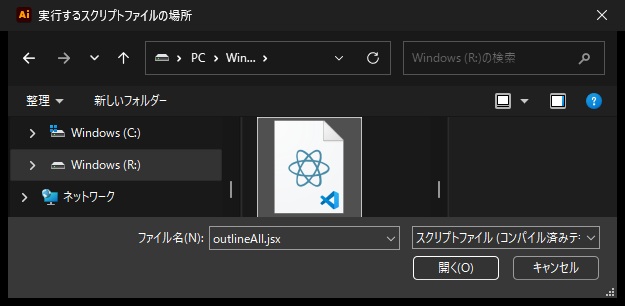
外部スクリプトについての警告は、この環境では表示されませんでした。
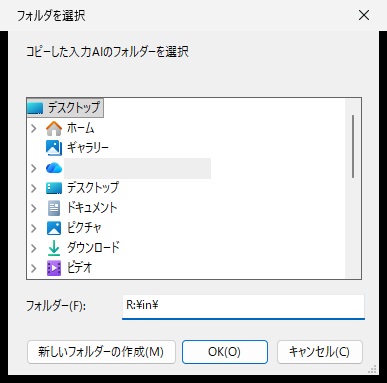
続いて「フォルダを選択」という画面が2回開きます。
1回目は入力用、2回目は出力用のフォルダーを「フォルダー」欄に入力し、[OK]を押しました。
OK・ERRORと件数を照合する
1回目の実行が終わると、「保存 2 / 失敗 1 / スキップ 0 / 未処理 0」というメッセージが表示されました。
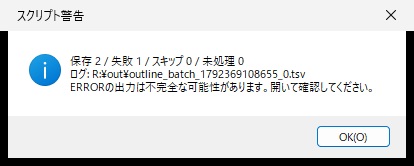
出力フォルダーにできたログ(TSV)では、poster.ai と card.ai がOK、locked-text.ai がERROR「編集できない文字があります」でした。
ERRORになったファイルの「_ol.ai」は作られず、出力フォルダーにはOKの2件とログ1件だけがありました。
入力の3件は、実行の前後でSHA256と更新日時が変わっていませんでした。
原因を解消したものだけ再処理する
ERRORの原因はロックした文字だったので、入力用フォルダーの locked-text.ai を、ロックを外した同じ内容のファイルに差し替えました(差し替えたファイルは別のスクリプトで作ったもので、確認には含めていません)。
同じ入力と出力のフォルダーでもう一度実行すると、メッセージは「保存 1 / 失敗 0 / スキップ 2 / 未処理 0」でした。
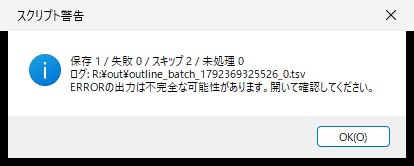
1回目にOKだった2件は「同名の出力があるため処理しません」としてスキップされ、出力のSHA256と更新日時は1回目のままでした。
差し替えた locked-text.ai だけが処理され、locked-text_ol.ai が保存されました。
2回目のログは、1回目とは別の名前の新しいファイルとして作られました。
| 入力 | 1回目 | 2回目(差し替え後) |
|---|---|---|
| poster.ai | OK。poster_ol.aiを保存 | SKIP。出力は1回目のまま |
| card.ai | OK。card_ol.aiを保存 | SKIP。出力は1回目のまま |
| locked-text.ai | ERROR「編集できない文字があります」。出力なし | ロックを外したファイルに差し替えてOK。locked-text_ol.aiを保存 |
保存された3件の「_ol.ai」を読み取りのスクリプトで開くと、どれも文字(textFrames)が0件で、文字はアウトラインのグループになっていました。
実行の後、Illustratorに開いたままのドキュメントは残りませんでした。
確かめていないこと
旧VBS方式の現行Windowsでの動作と、外部自動化との連携は試していません。
ドラッグ&ドロップで起動する方法、Mac、ほかの版、日本語のファイル名、大量のファイルは確かめていません。
出力の見た目(文字の形や位置)は、今回は画面で見比べていません。
参照資料と確認範囲
旧VBSの現行Windowsでの動作と、外部自動化との連携は確かめていません。
代替の一括アウトラインは、2026年10月19日にIllustrator 2026(30.8.2)とWindows 11 Pro(10.0.26200)で画面から実行して確かめました(前の節)。
本文の旧コードを撤去したことを、外部の配布物まで更新したという意味では扱わないでください。
よくある質問:ドラッグ&ドロップによる旧方式の一括処理
この記事は、何について書かれたものですか?
AIファイルをドラッグ&ドロップして、VBScriptからIllustratorを動かす旧方式の構成を説明する、旧方式の資料です。外部ランチャー、Illustratorへの自動化呼び出し、JSXの3段階で構成されます。新しい一括処理には、Illustrator内から実行するJSXを案内しています。
旧方式は、どんな構成でしたか?
VBSランチャー(ドロップしたファイルのパスを受け取る)、外部自動化(Illustratorの起動や文書を開く操作を呼ぶ)、JSX(開いた文書にアウトラインなどの処理を行う)の3段階です。確認が必要な点として、拡張子・複数パス・引用符・フォルダーの扱い、既存の未保存文書へ干渉しないか・終了時に保存するか、ロック解除・上書き・処理失敗・出力の確認が挙げられています。
旧掲載コードは、なぜ取り下げられたのですか?
旧コードには、保存・終了の扱いや入力ファイルの保全を十分に確認できない部分と、レイヤーを一律に解除する処理がありました。開いている文書へ影響しないことを確認できていないため、2026年10月3日に実行用のVBS・JSXを本文から取り下げました。外部リポジトリに残る旧版を、現在の推奨手順と同じものとして扱わないでください。
VBScriptは、もう使えないのですか?
MicrosoftはVBScriptを非推奨にし、将来の削除へ向けた段階的な移行を案内しています。非推奨は、すべてのWindows環境ですでに実行不能という意味ではありません。ただし、新しい運用のためにVBScriptを有効化する手順は、この記事では案内していません。
現在の一括アウトラインは、どうすればよいですか?
AIをコピーして入力用フォルダーへ集め、入力と別の出力先を用意します。Illustrator内から、別名保存と結果ログを備えたアウトラインJSXを実行します。OK・ERROR・SKIPと件数を照合し、出力を開いて外観や文字の結果を確認します。失敗したファイルを手動で確認し、その原因が解消したものだけ再処理します。
ドラッグ&ドロップの操作は、新しい方式でも再現できますか?
この代替方式はドラッグ&ドロップの操作を再現するものではありません。保存先と結果を確認しながら、複数のAIを処理するための手順です。起動方法は「JSXの保存・実行」の記事、PDFを作る用途は「PDF一括変換」の記事を参照してください。
外部リポジトリの旧コードも、更新されていますか?
本文の旧コードを撤去したことを、外部の配布物まで更新したという意味では扱わないでください。外部リポジトリに残る旧版は、現在の推奨手順と同じものではありません。
記事の内容は、どこまで確認されていますか? 最新はどこで確認しますか?
旧VBSの現行Windowsでの動作と、外部自動化との連携は確かめていません。
代替の一括アウトラインは、2026年10月19日にIllustrator 2026(30.8.2)とWindows 11 Pro(10.0.26200)で画面から実行し、ERRORになったファイルだけを直して再処理できることを確かめました。
参照資料は、MicrosoftのWindowsの非推奨機能一覧と、Adobeのスクリプトのインストールと実行です。
仕様は変わることがあるため、最新はそれぞれの公式資料で確認してください。









コメント
コメント一覧 (38件)
Thanks for another great post. Where else could anybody get that kind of information in such a perfect approach of writing? I have a presentation next week, and I’m at the look for such info.
My husband and i have been absolutely delighted that Jordan managed to deal with his homework by way of the ideas he acquired from your own weblog. It’s not at all simplistic just to find yourself giving freely ideas other people may have been selling. Therefore we know we now have the blog owner to thank for that. The main illustrations you made, the easy website navigation, the friendships your site make it easier to promote – it’s mostly excellent, and it’s really assisting our son in addition to us understand that theme is amusing, and that’s quite pressing. Thanks for all!
certainly like your web site but you need to check the spelling on several of your posts. Several of them are rife with spelling problems and I find it very troublesome to tell the truth nevertheless I will certainly come back again.
Regards for helping out, good information. “In case of dissension, never dare to judge till you’ve heard the other side.” by Euripides.
Hi there would you mind letting me know which hosting company you’re utilizing? I’ve loaded your blog in 3 different browsers and I must say this blog loads a lot quicker then most. Can you recommend a good hosting provider at a fair price? Many thanks, I appreciate it!
Wow! Thank you! I permanently needed to write on my blog something like that. Can I implement a part of your post to my site?
Very interesting topic, appreciate it for posting. “Nothing is more wretched than the mind of a man conscious of guilt.” by Titus Maccius Plautus.
순천출장마사지 타임케어 – 순천출장홈타이와 순천출장안마 순천홈타이 서비스를 전국 어디서나 24시간 편하게! 전문 마사지사의 맞춤 홈케어로 피로를 빠르게 해소
I just couldn’t depart your site prior to suggesting that I really enjoyed the usual information an individual supply to your guests? Is gonna be again incessantly in order to investigate cross-check new posts.
시알리스의 성분인 타다라필과 효과, 지속시간, 5mg·10mg·20mg 차이를 알아보세요. 복용 방식, 부작용, 함께 복용하면 안 되는 약, 처방과 가격 확인 방법을 정리했습니다.
비아그라 구매 전 알아야 할 국내 처방 절차와 약국 이용 방법, 가격 확인 기준을 안내합니다. 실데나필 성분, 정품 확인 시 주의점, 복용 전 상담사항과 자주 묻는 질문을 확인하세요.
팔팔정의 성분과 효과, 50mg·100mg 차이, 복용 시간과 부작용을 확인하세요. 처방 및 가격 확인 방법, 함께 복용하면 안 되는 약, 자주 묻는 질문까지 안내합니다.
경기도 안양출장마사지 셀럽의 코스와 가격, 자택·호텔 방문 상담, 선입금 없는 예약 및 현장 결제 기준을 확인하세요. 방문 가능 여부와 예상 도착 시간은 주소와 당일 일정에 따라 안내합니다.
Hey! Do you know if they make any plugins to help with Search Engine Optimization? I’m trying to get my blog to rank for some targeted keywords but I’m not seeing very good results. If you know of any please share. Thank you!
Good post. I study something tougher on different blogs everyday. It can at all times be stimulating to learn content material from other writers and follow a bit of something from their store. I’d desire to make use of some with the content material on my weblog whether or not you don’t mind. Natually I’ll give you a link in your web blog. Thanks for sharing.
Greetings! I know this is kinda off topic but I was wondering if you knew where I could locate a captcha plugin for my comment form? I’m using the same blog platform as yours and I’m having difficulty finding one? Thanks a lot!
Hello my friend! I wish to say that this article is amazing, great written and come with approximately all important infos. I would like to see more posts like this .
I’m impressed, I have to say. Really rarely do I encounter a weblog that’s both educative and entertaining, and let me tell you, you’ve gotten hit the nail on the head. Your thought is outstanding; the problem is one thing that not sufficient individuals are talking intelligently about. I’m very joyful that I stumbled throughout this in my seek for something relating to this.
wonderful publish, very informative. I wonder why the other experts of this sector don’t notice this. You must proceed your writing. I’m confident, you have a great readers’ base already!
you’ve gotten a fantastic blog here! would you like to make some invite posts on my weblog?
Generally I do not read article on blogs, however I would like to say that this write-up very forced me to take a look at and do it! Your writing taste has been surprised me. Thanks, quite nice article.
Some really interesting information, well written and broadly user genial.
I have recently started a site, the information you provide on this website has helped me greatly. Thanks for all of your time & work.
You got a very wonderful website, Sword lily I discovered it through yahoo.
I like this weblog very much, Its a very nice billet to read and get information.
Great line up. We will be linking to this great article on our site. Keep up the good writing.
I think other website proprietors should take this website as an model, very clean and excellent user friendly style and design, let alone the content. You’re an expert in this topic!
I would like to thnkx for the efforts you have put in writing this blog. I am hoping the same high-grade blog post from you in the upcoming as well. In fact your creative writing abilities has inspired me to get my own blog now. Really the blogging is spreading its wings quickly. Your write up is a good example of it.
Merely a smiling visitant here to share the love (:, btw outstanding design and style. “Justice is always violent to the party offending, for every man is innocent in his own eyes.” by Daniel Defoe.
It’s really a nice and helpful piece of information. I’m glad that you shared this helpful info with us. Please keep us informed like this. Thanks for sharing.
I am not real good with English but I find this rattling leisurely to interpret.
Wow, amazing weblog structure! How long have you been blogging for? you make running a blog look easy. The whole glance of your site is wonderful, as smartly as the content!
Hi my family member! I want to say that this post is amazing, great written and come with approximately all significant infos. I would like to look extra posts like this .
Some truly great content on this website , appreciate it for contribution.
In the grand scheme of things you secure an A just for effort. Exactly where you misplaced me was in your particulars. You know, people say, the devil is in the details… And that could not be more true at this point. Having said that, allow me tell you just what exactly did do the job. The writing is certainly very engaging which is possibly the reason why I am taking the effort in order to opine. I do not really make it a regular habit of doing that. Secondly, despite the fact that I can notice the leaps in logic you make, I am not really sure of how you seem to connect the details which help to make the actual final result. For right now I will, no doubt yield to your issue but trust in the future you connect your facts better.
Hmm is anyone else experiencing problems with the images on this blog loading? I’m trying to determine if its a problem on my end or if it’s the blog. Any feedback would be greatly appreciated.
Hello. remarkable job. I did not anticipate this. This is a excellent story. Thanks!
Thankyou for this wonderful post, I am glad I observed this website on yahoo.