
FigmaのノードIDを指定すると、対象のレイヤーを探して選択できます。このプラグインは現在の選択からIDを取得し、複数行のIDを受け取って同じページのレイヤーを選びます。別ページのIDや取得できないIDはスキップとして数えます。
ノードIDの表記と入力
| 入力 | 扱い |
|---|---|
| 12:34 | Plugin APIのIDとして使う |
| 12-34 | 単純な数値IDに限り12:34へ変換する |
| 名前とTABとID | 最後のTABの後ろをIDとして使う |
| 同じIDの複数行 | 1件にまとめる |
末尾の:00や、インスタンス内部のIDに含まれる文字は一律に削りません。URL全体ではなくnode-idの値を入力します。元の記事の取得欄は名前とTABとIDを出すため、その内容を入力へ戻せるようにしています。
選択の範囲と使い方
- 複製したファイルで起動します。
- 現在の選択からIDを取得するか、入力欄へ1行1IDで貼り付けます。
- 選択ボタンを押します。
- 最初の有効な対象のページへ移り、そのページに属する対象を選択します。
- 選択件数とスキップ件数を確認します。
Figmaのselectionは現在のページに属するレイヤーの配列です。異なるページを混ぜて一括選択することはしません。対象が1件も取得できない場合は、元の選択を残します。出典:ノード取得・ページ切り替えAPI、PageNode。
ファイルを作成する
FigmaのNew pluginで生成したmanifestを基に、次の設定を使います。掲載例ではidを省略しています。自分のmanifestに割り当てられたidがある場合はその値を保ち、サンプルの任意文字列に置き換えません。3ファイルを同じフォルダへ保存してください。
manifest.json
{
  "name": "ノードIDで選択",
  "api": "1.0.0",
  "main": "code.js",
  "ui": "ui.html",
  "editorType": [
    "figma"
  ],
  "documentAccess": "dynamic-page",
  "networkAccess": {
    "allowedDomains": [
      "none"
    ]
  }
}
code.js
figma.showUI(__html__, { width: 350, height: 520 });
function normalizeId(raw) {
  const fields = String(raw || "").trim().split("\t");
  const id = fields[fields.length-1].trim();
  return /^\d+-\d+$/.test(id) ? id.replace("-", ":") : id;
}
function pageOf(node) {
  let n = node;
  while (n && n.type !== "PAGE") n = n.parent;
  return n;
}
function reportSelection() {
  figma.ui.postMessage({ type: "selected-ids", ids: figma.currentPage.selection.map(n => n.name.replace(/[\t\r\n]/g," ")+"\t"+n.id) });
}
let busy = false;
figma.ui.onmessage = async msg => {
  if (!msg || busy) return;
  if (msg.type === "get-selected-ids") { reportSelection(); return; }
  if (msg.type !== "select-by-id" || !Array.isArray(msg.ids)) return;
  busy = true;
  try {
    const ids = Array.from(new Set(msg.ids.map(normalizeId).filter(Boolean)));
    const nodes = []; let page = null, skipped = 0;
    for (const id of ids) {
      let node;
      try { node = await figma.getNodeByIdAsync(id); } catch (_) { skipped++; continue; }
      if (!node || !("visible" in node)) { skipped++; continue; }
      const p = pageOf(node);
      if (!p || (page && p.id !== page.id)) { skipped++; continue; }
      page = p; nodes.push(node);
    }
    if (nodes.length) {
      await figma.setCurrentPageAsync(page);
      figma.currentPage.selection = nodes;
      figma.viewport.scrollAndZoomIntoView(nodes);
    }
    figma.ui.postMessage({ type: "selection-result", selected: nodes.length, skipped });
    reportSelection();
  } catch (_) { figma.ui.postMessage({ type: "selection-result", selected: 0, skipped: msg.ids.length }); }
  finally { busy = false; }
};
figma.on("selectionchange", reportSelection);
ui.html
<!DOCTYPE html>
<html lang="ja">
  <head>
    <meta charset="utf-8" />
    <title>ノードIDで選択</title>
    <style>
      body {
        font: 13px/1.6 -apple-system, BlinkMacSystemFont, "Segoe UI", Roboto,
          "Hiragino Sans", "Noto Sans JP", "メイリオ", sans-serif;
        margin: 12px;
      }
      textarea {
        width: 100%;
        height: 110px;
        box-sizing: border-box;
      }
      .row {
        margin: 10px 0;
      }
      .btn {
        padding: 8px 10px;
        border: 1px solid #ccc;
        background: #f7f7f7;
        cursor: pointer;
        border-radius: 6px;
      }
      .btn:active {
        transform: translateY(1px);
      }
      .muted {
        color: #666;
        font-size: 12px;
      }
      .grid {
        display: grid;
        grid-template-columns: 1fr auto;
        gap: 8px;
        align-items: center;
      }
      .stack {
        display: grid;
        gap: 8px;
      }
      hr {
        border: none;
        border-top: 1px solid #e5e5e5;
        margin: 14px 0;
      }
    </style>
  </head>
  <body>
    <div class="stack">
      <div class="row">
        <h3 style="margin: 0 0 8px">レイヤーIDで選択</h3>
        <textarea
          id="idsInput"
          placeholder="複数行にIDを貼り付けてください(例:I123:45)"
        ></textarea>
        <div class="grid">
          <span class="muted">各行を1つのIDとして処理します。</span>
          <button id="selectBtn" class="btn">選択</button>
        </div>
      </div>

      <hr />

      <div class="row">
        <h3 style="margin: 0 0 8px">現在の選択からID取得</h3>
        <div class="grid">
          <span class="muted">「名前 ID」形式で出力します。</span>
        </div>
        <textarea id="output" readonly></textarea>
        <div style="text-align: right">
          <button id="getBtn" class="btn">取得</button>
          <button id="copyBtn" class="btn">コピー</button>
        </div>
      </div>
    </div>

    <script>
      function splitLines(text) {
        return text.split(/\r?\n/);
      }
      function post(type, payload) {
        parent.postMessage(
          { pluginMessage: Object.assign({ type: type }, payload || {}) },
          "*"
        );
      }

      document.getElementById("selectBtn").onclick = function () {
        var raw = document.getElementById("idsInput").value;
        var ids = splitLines(raw);
        post("select-by-id", { ids: ids });
      };

      document.getElementById("getBtn").onclick = function () {
        post("get-selected-ids", {});
      };

      document.getElementById("copyBtn").onclick = function () {
        var text = document.getElementById("output").value;
        if (!text) {
          alert("コピーする内容がありません");
          return;
        }
        // 利用環境によって権限・対応が異なるため、失敗時は手動コピーを案内する
        navigator.clipboard.writeText(text).then(
          function () {
            alert("コピーしました");
          },
          function () {
            // フォールバック
            var ta = document.getElementById("output");
            ta.focus();
            ta.select();
            try {
              const copied = document.execCommand("copy");
              alert(copied ? "コピーしました" : "選択した文字を手動でコピーしてください");
            } catch (e) {
              alert("コピーに失敗しました");
            }
          }
        );
      };

      // プラグイン本体からのメッセージ受信
      window.onmessage = function (event) {
        if (event.source !== parent) return;
        var msg =
          event.data && event.data.pluginMessage
            ? event.data.pluginMessage
            : null;
        if (!msg) return;
        if (msg.type === "selection-result") alert("選択" + msg.selected + "件 / スキップ" + msg.skipped + "件");
        if (msg.type === "selected-ids" && msg.ids) {
          document.getElementById("output").value = msg.ids.join("\n");
        }
      };
    </script>
  </body>
</html>
取得できない場合とコピーの注意点
別ファイルのIDは、現在開いているファイル内の対象を指すとは限りません。ファイルとIDの組み合わせを確認します。PageやDocument自体はレイヤーの選択対象に含めません。
クリップボードへのコピーは、環境の権限・API対応によって失敗する場合があります。失敗時は出力欄の文字を選択して手動でコピーします。コピーの要求を送っただけで成功とは扱わない実装です。
ファイルキーとIDからURLを作る場合はレイヤーURLの一括出力を参照してください。
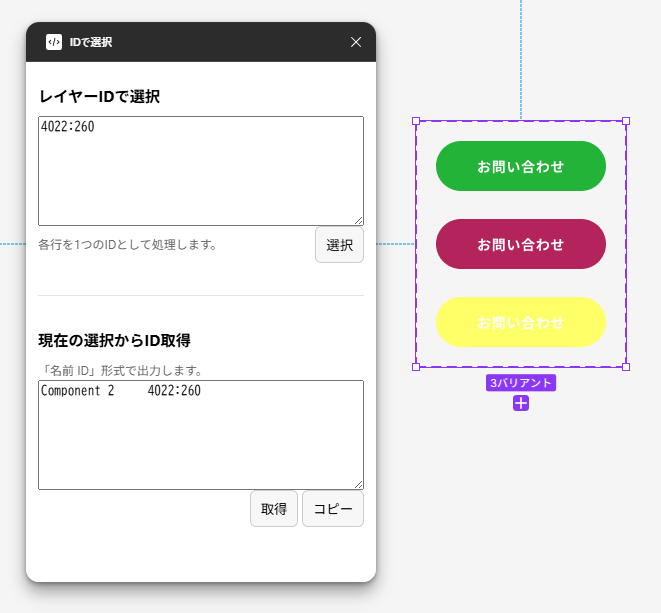
元記事の操作例
以下は元記事で掲載していた開発時の画面です。今回のコード改稿後に撮影した検証画像ではありません。現行の表示や変更結果は、複製したファイルで確認してください。
検証範囲と関連ガイド
今回確認したのは掲載コードの構文と、該当する入力・例外処理のローカル模擬検証です。Figmaデスクトップアプリ上での動作確認とは区別しています。改稿後のコードと、元記事が参照していたGitHub上の版が一致するとは限りません。
開発環境と登録手順はFigmaプラグイン開発入門、公開はCommunityへの申請を参照してください。