Figmaファイル内で外部ライブラリのスタイルを参照しているレイヤーを、一括で検出してCSV形式で書き出すプラグインの実装手順を解説します。
- デザインシステムの運用中に、意図しない外部スタイルの混入を検出したい
- リンク切れや不要な外部依存の原因となっている箇所を特定したい
- デザインの整合性維持や保守運用のために監査ログを残したい
手動の目視確認には多くの工数がかかるため、プラグインを用いて全レイヤーを自動で走査します。
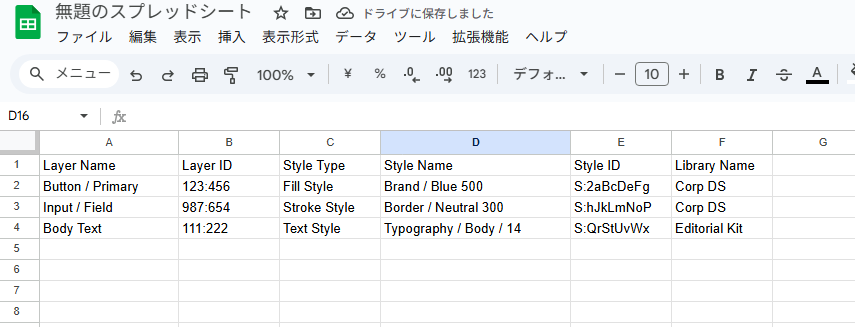
出力結果の例です。
目次
外部スタイル参照を一括検出してCSV出力するプラグインの仕組み
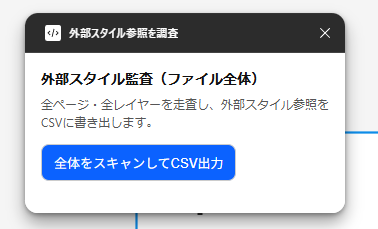
ローカルに定義されていない外部スタイルが適用されているレイヤーを、ファイル内から走査して検出します。
プラグインの処理手順は次のとおりです。
- ローカルに存在するすべてのスタイルIDを取得してキャッシュする
- 各レイヤーに設定されたスタイルIDがローカル一覧に含まれるかを判定する
- ドキュメント内のノードツリーを深さ優先で走査する
- 検出したスタイル情報をCSV形式に整形してUI側へ送信する
プラグインを構成する各ファイルのコードです。
ローカルスタイルの一覧をCSV形式で出力する方法は、以下の記事で解説しています。
あわせて読みたい


Figma│スタイル情報一覧を出力するプラグイン
Figmaで定義するテキストスタイルやカラースタイルは、WebサイトのコーディングやUnity開発など、デザインの統一性を保つために広く参照されます。 プロジェクトの規模…
manifest.json
{
  "name": "外部スタイル参照を調査",
  "id": "check-external-styles",
  "api": "1.0.0",
  "main": "code.js",
  "ui": "ui.html",
  "editorType": ["figma"],
  "permissions": ["currentuser"]
}
code.js
// ローカルスタイルIDをキャッシュ(Paint / Effect / Text / Grid)
const localStyleIds = new Set(
  [
    ...figma.getLocalPaintStyles(),
    ...figma.getLocalEffectStyles(),
    ...figma.getLocalTextStyles(),
    ...figma.getLocalGridStyles(),
  ].map((s) => s.id)
);

function isExternalStyle(style) {
  return !!style && style.remote === true && !localStyleIds.has(style.id);
}

function checkExternalStyleUsage(node) {
  const result = [];

  function add(styleId, type) {
    if (!styleId || typeof styleId !== "string") return; // figma.mixed は弾く
    const style = figma.getStyleById(styleId);
    if (isExternalStyle(style)) {
      result.push({
        name: node.name,
        id: "'" + node.id, // Excel誤変換防止
        type,
        styleName: style.name,
        styleId: style.id,
        libraryName: (style && style.libraryName) || "不明",
      });
    }
  }

  try {
    add(node.fillStyleId, "Fill Style");
  } catch (e) {}
  try {
    add(node.strokeStyleId, "Stroke Style");
  } catch (e) {}
  try {
    add(node.effectStyleId, "Effect Style");
  } catch (e) {}
  if ("textStyleId" in node) {
    try {
      add(node.textStyleId, "Text Style");
    } catch (e) {}
  }

  return result;
}

function walk(node, acc) {
  // SceneNodeのみチェック
  if (node && node.type && typeof node.type === "string") {
    try {
      acc.push(...checkExternalStyleUsage(node));
    } catch (e) {}
  }
  if ("children" in node && Array.isArray(node.children)) {
    for (const child of node.children) {
      walk(child, acc);
    }
  }
}

function getTimestamp() {
  const now = new Date();
  const yyyy = now.getFullYear();
  const mm = String(now.getMonth() + 1).padStart(2, "0");
  const dd = String(now.getDate()).padStart(2, "0");
  const hh = String(now.getHours()).padStart(2, "0");
  const min = String(now.getMinutes()).padStart(2, "0");
  return `${yyyy}-${mm}-${dd}_${hh}${min}`;
}

function toCSV(rows) {
  const headers = [
    "Layer Name",
    "Layer ID",
    "Style Type",
    "Style Name",
    "Style ID",
    "Library Name",
  ];
  const records = rows.map((r) => [
    r.name,
    r.id,
    r.type,
    r.styleName,
    r.styleId,
    r.libraryName,
  ]);
  return [headers, ...records]
    .map((row) =>
      row.map((c) => `"${String(c).replace(/"/g, '""')}"`).join(",")
    )
    .join("\n");
}

// ---- UIを表示(小さめのモーダル) ----
figma.showUI(__html__, { width: 320, height: 160 });

figma.ui.onmessage = (msg) => {
  if (!msg || typeof msg !== "object") return;

  if (msg.type === "export") {
    const allResults = [];

    // ファイル全体:全ページを起点に再帰走査
    for (const page of figma.root.children) {
      if (page.type === "PAGE") {
        walk(page, allResults);
      }
    }

    if (allResults.length === 0) {
      figma.notify(
        "外部スタイルを参照しているレイヤーは見つかりませんでした。"
      );
      figma.ui.postMessage({ type: "error", message: "外部スタイルなし。" });
      return;
    }

    const csv = toCSV(allResults);
    const filename = `external_styles_${getTimestamp()}.csv`;
    figma.ui.postMessage({ type: "download", csv, filename });
  }

  if (msg.type === "close") {
    figma.closePlugin();
  }
};
ui.html
<!DOCTYPE html>
<html lang="ja">
  <head>
    <meta charset="utf-8" />
    <title>外部スタイル参照を調査</title>
    <meta name="viewport" content="width=device-width,initial-scale=1" />
    <style>
      html,
      body {
        margin: 0;
        padding: 0;
        font-family: -apple-system, BlinkMacSystemFont, "Segoe UI", Roboto,
          "Hiragino Kaku Gothic ProN", Meiryo, "Noto Sans JP", Arial, sans-serif;
        color: #111;
        background: #fff;
      }
      .container {
        padding: 16px;
      }
      h1 {
        font-size: 14px;
        margin: 0 0 6px;
        font-weight: 700;
      }
      p {
        font-size: 12px;
        margin: 0 0 12px;
        color: #555;
      }
      .actions {
        display: flex;
        align-items: center;
        gap: 8px;
      }
      button {
        appearance: none;
        border: 1px solid #ccc;
        background: #0b62ff;
        color: #fff;
        font-size: 13px;
        padding: 8px 12px;
        border-radius: 8px;
        cursor: pointer;
      }
      button:disabled {
        opacity: 0.6;
        cursor: not-allowed;
      }
      .status {
        font-size: 11px;
        color: #666;
      }
    </style>
  </head>
  <body>
    <div class="container" role="main" aria-labelledby="title">
      <h1 id="title">外部スタイル調査</h1>
      <p>全ページ・全レイヤーを走査し、外部スタイル参照をCSVに書き出します。</p>
      <div class="actions">
        <button id="run" type="button">全体をスキャンしてCSV出力</button>
        <span
          id="status"
          class="status"
          role="status"
          aria-live="polite"
        ></span>
      </div>
    </div>

    <script>
      let csv = "",
        filename = "";
      const runBtn = document.getElementById("run");
      const statusEl = document.getElementById("status");

      function setLoading(on, text) {
        runBtn.disabled = !!on;
        statusEl.textContent = text || "";
      }

      function requestExport() {
        if (runBtn.disabled) return;
        setLoading(true, "ファイル全体を走査中…");
        parent.postMessage({ pluginMessage: { type: "export" } }, "*");
      }

      runBtn.addEventListener("click", requestExport);

      // Enter キーでも実行
      window.addEventListener("keydown", (e) => {
        if (e.key === "Enter") {
          e.preventDefault();
          requestExport();
        }
      });

      onmessage = (event) => {
        const msg = event.data.pluginMessage;
        if (!msg) return;

        if (msg.type === "download") {
          csv = msg.csv;
          filename = msg.filename;

          try {
            const blob = new Blob([csv], { type: "text/csv;charset=utf-8;" });
            const url = URL.createObjectURL(blob);
            const a = document.createElement("a");
            a.href = url;
            a.download = filename;
            document.body.appendChild(a);
            a.click();
            a.remove();
            URL.revokeObjectURL(url);
            setLoading(false, "ダウンロード完了");
          } catch (err) {
            alert("ダウンロードに失敗しました。");
            setLoading(false, "");
          } finally {
            parent.postMessage({ pluginMessage: { type: "close" } }, "*");
          }
        }

        if (msg.type === "error") {
          setLoading(false, "");
          alert(msg.message || "エラーが発生しました。");
        }
      };
    </script>
  </body>
</html>
実装コードは以上です。
プラグインを実行し、外部スタイルの検出結果とCSV出力の内容を確認します。
Figmaプラグインの開発に関する記事は、ほかにもあります。
あわせて読みたい

Figma│コンポーネントの情報を出力するFigmaライブラリ
特定のFigmaファイルの情報をGoogleスプレッドシートに出力するGASライブラリを作成しました。 このライブラリは「Figma をスプレッドシート用の疑似DBに変換するエンジ…
あわせて読みたい

Figmaプラグイン│インスタンス名と参照元の名前を比較・変更する方法
Figmaでコンポーネントライブラリを運用していると、メインコンポーネントの名前を変更してもインスタンス側に反映されないケースがあります。 インスタンスの名前を変…
あわせて読みたい

Figma│選択レイヤーのURLを一括取得できるプラグイン
通常はノードを選択し、右クリックメニューの「コピー/貼り付け」>「選択範囲へのリンクをコピー」からURLを取得できます。 複数のノードからまとめてURLを取得する…
あわせて読みたい

Figmaプラグイン│プログレスバーの実装方法
Figmaプラグインの開発において、大量ノードのスキャンやCSV書き出しといった時間のかかる処理を実行する際は、進捗状況の表示が役立ちます。 この記事では、Figmaプラ…